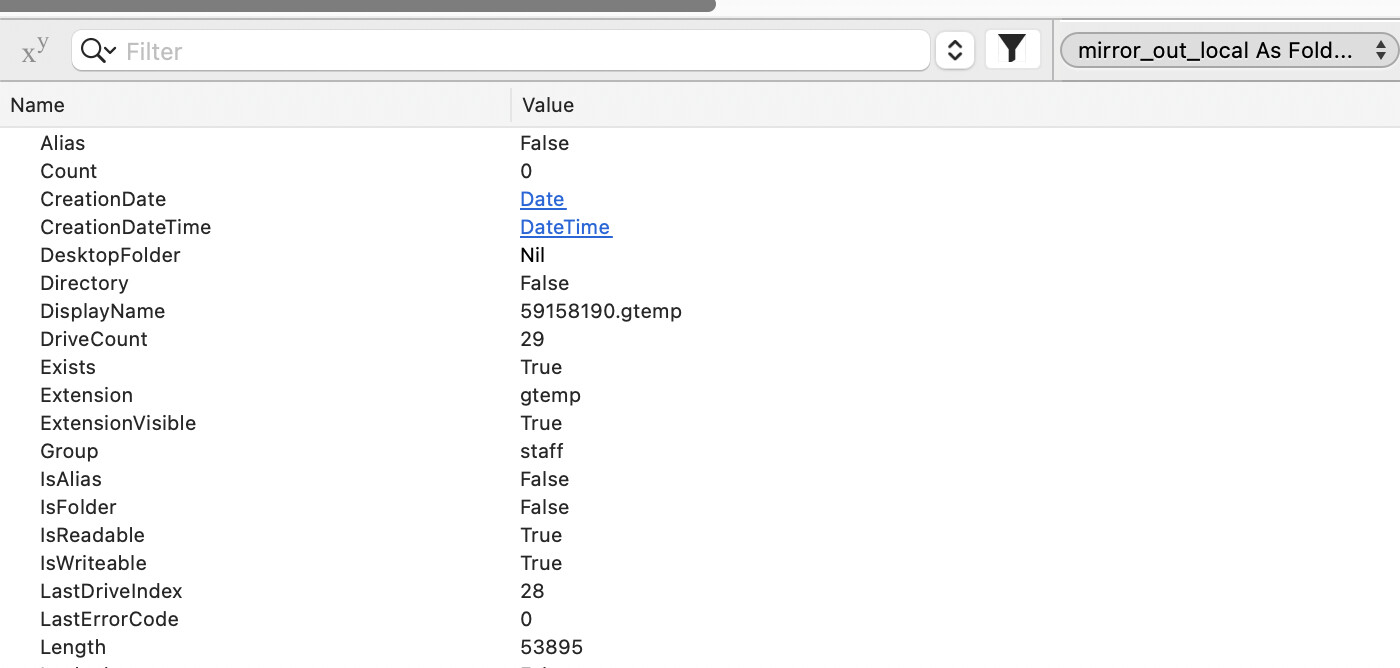
mirror_out_local is a local file just copied from a server via rsync. strongLength is an f.extended method I wrote for reliable length values:
dim sh as new Shell
dim cmd as string
dim path as string = f.ShellPath

sh.mode = 0   ’ synchronous
cmd = "wc -c < " + path

sh.Execute cmd

dim res as string = sh.Result

return val(res)
(in fact i also had to write analogous strongExists and strongDelete methods because these were unreliable, at least in the past).
You can see from the variable list the differing values for the 2 lengths. This is executing from a pre-emptive thread. the second is the correct length as reported by the debugger itself:
Create FolderItem to represent the destination file on the local disk
Use that FolderItem to build a shell command to copy it from a remote system
Check the FolderItem’s size after the copy completes
If so, try creating a new FolderItem after the copy completes to check the newly copied file’s attributes. Using the pre-copy object may result in cached information being reported.
yes the mirror_out folderitem is created once and stored in the window’s property (it’s always at the same path for the life of the operation), and the rsync command copies a remote file always to this path on the local volume, so i’d expect f.length to always return the current size of the file at that path. The debugger seems to.
But I suspect you’re right, i’m getting a stale cached value instead. this is very misleading.
What are the result without using the shell (hatever is not “direct” FolderItem) ?
Also, do the test after a cold reboot (shutdown, wait a minute or two), run Xojo (ONLY, no other application) PLANE MODE, this test only (not after some hours of work).
Check also that you have more than 50 GB free in your SSD (or HD).
Compare the value with the explorer | finder get info value.
BTW: saving data as binary (so no TEXT, no Encoding) is a must.
IIRC, On macOS anyway, when you have a folderitem pointing to a file and the file underneath gets replaced, the folderitem can now point to a non-existent item, and returns the cached file info. Just after starting the rsync, I would recreate the folderitem(s) to point to the right item on disk.
Yep this is true (on macOS, no Windows experience here). If the file at the path gets replaced, the FolderItem needs to be recreated in order to be referencing the new file.
Thx for this advice Greg and Jared. I guess we need to be aware that a folderitem is not just a filepath. Not sure if the xojo docs emphasize this, but they probably should. Regardless, i think i’ll stick to my f.StrongXXX methods as they always do what I expect them to, without worrying if the target file was replaced but remains at the same path.
That’s OK as long as you only need accurate data that is provided by your StrongXXX methods; but what about all the other FolderItem properties? It might be wiser in the long term to get into the habit of creating new FolderItem objects when appropriate.
Which may include when other apps, including the Finder, are dealing with the item in the “background”, too (e.g. the user is moving the file at the same time). I can’t see how to handle that otherwise than re-creating the folderitem at each step:
Var f as new FolderItem(PathToFile)
Var FileName as string=f.Name
f=new FolderItem(PathToFile)
Var CreationDate as DateTime=f.CreationDateTime
f=new FolderItem(PathToFile)
Var Extension as string=f.Extension
I know, it’s a silly example, but since the file may disappear (or even be replaced by another one) in parallel, I can’t see a better way to be sure the file is always the one we’d expect.
It’s a matter of accepting the file may change while the code runs versus having ugly code. I guess there’s no compromise.
Extending the FolderItem class is a fairly clean way to do it.
Public Function Refresh(Extends aFolderItem As FolderItem) As FolderItem
  Try
    Return New FolderItem(aFolderItem.NativePath, FolderItem.PathModes.Native)
  Catch e As UnsupportedFormatException
    Return Nil
  End
End Function
Var f As New FolderItem("/path/to/file", FolderItem.PathModes.Native)
// Do stuff...
f = f.Refresh