An outside automation emails a .XLS file to our system, where we need to programatically open and ingest the data. What is the most straightforward way to ingest XLS data? This is a headless service app - no human interface.
If the file can be XLSX, it’s a pretty straightforward XML data structure.
Thanks Eric - and I hope you don’t mind me asking a little more. Could it be as simple as passing the .XLSX into an XML constructor? XMLDocument — Xojo documentation
You can open it as if it were text. Xojo can read and manipulate text files. Once opened, you treat the entire text string as XML to determine where the information you’re looking for is.
Other option.
Xojo can open a file in Excel using OLE/COM automation. It works very well.
You can see the documentation:
The code sample:
Try
  Var excel As New ExcelApplication
  Var book As ExcelWorkbook
  Var sheet As ExcelWorksheet

  excel.Visible = True
  book = excel.Workbooks.Add
  excel.ActiveSheet.Name = "Expenses Report"
  For i As Integer = 0 To ProduceList.RowCount - 1
    excel.Range("A" + Str(i + 1), "A" + Str(i + 1)).Value = ProduceList.CellTextAt(i, 0)
    excel.Range("B" + Str(i + 1), "B" + Str(i + 1)).Value = ProduceList.CellTextAt(i, 1)
  Next
  excel.Range("A" + Str(ProduceList.RowCount + 1), "A"+ _
    Str(ProduceList.RowCount + 1)).Value = "Total"
  excel.Range("B1", "B" + Str(ProduceList.RowCount)).Style = "Currency"
  excel.Range("B" + Str(ProduceList.RowCount + 1), "B"+ _
    Str(ProduceList.RowCount + 1)).Value = "=SUM(B1:B" + _
    Str(ProduceList.RowCount) + ")"
Catch err As OLEException
    MessageBox(err.Message)
End Try
Isn’t OLE a Windows-only technology? Sorry, I mentioned it being “headless” - I should also have said WebApp.
Yes…
Is Windows-only tech.
WebApp.
It’s better to use it as a file.
Yes, with the caveat that XLSX files are actually ZIP files – basically, a document bundle in Mac terms – and you’ll have to extract the XML file out of it. But once you do, you can throw it at XMLDocument and you’ll have all the data in memory. The next task will be to parse it to get at the data, which isn’t terribly difficult.
No. XLSX files are actually zip archives with XML files inside. You’d need to extract the XML files and then use the XMLDocument class to read them.
Well is there at least a standardized naming structure to get to ‘workbook1’ etc? 
I just peeked inside one and it looks like /xl/worksheets/sheet1.xml
Hello @William_Reynolds,
If you are managing the email inbox from Xojo you’ll likely need a plugin that does IMAP, because you will want to process the inbox, then migrate emails from the queue to folders etc, and likely reply.
A couple of viable options for the excel part:
- Einhugar Excel Writer 5.5 Plugin (works with web)
- running a headless version of OpenOffice on your webserver.
- or making Powershell calls from Xojo to an PS excel library on Windows or Linux etc.
I’ve tried a bunch of variations.
No preference without knowing your throughput…but messing round in the native XML format is the last thing I would propose.
Also maybe review why you are receiving excel data at all. Maybe the input could be captured more directly, using an WebListBox or editable GraffitiGrid or web form, then straight to db.
I hope that helps.
Kind regards, Andrew
Please check out the MBS Xojo XL Plugin using LibXL.
With LibXL we can read and write XLS and XLSX files. Read and write cells, define and inspect formats and font definitions, add pictures and more.
Using Excel XML is not so straightforward, since there is a lot of referencing, no flat xml. Using lib from Christian or Björn is much easier.
if you use a little any AI agent, they will easily build a simple extraction method for you in xojo code.
especially if you only need to read them in a known structure that is always the same.
EDIT: PS: I’m not talking about Jade …
Stupid question: does it have to be Excel? CSV would be so much easier to handle.
Are you sure ? YES, but choose your unzip application: read below.
I exported as .XLSX a Google SHeet created document and a right-click in macOS does not allows to open it (so not a document bundle) and setting the extension to zip is also a bad idea: this document cannot be unzipped was the message from macOS Tahoe built in zip application I get.
BUT: th internal signature is PK (it’s a zip) and I can see .xml near the signature. The file is binary.
And once I set the extension to cbz and open it with , I get:
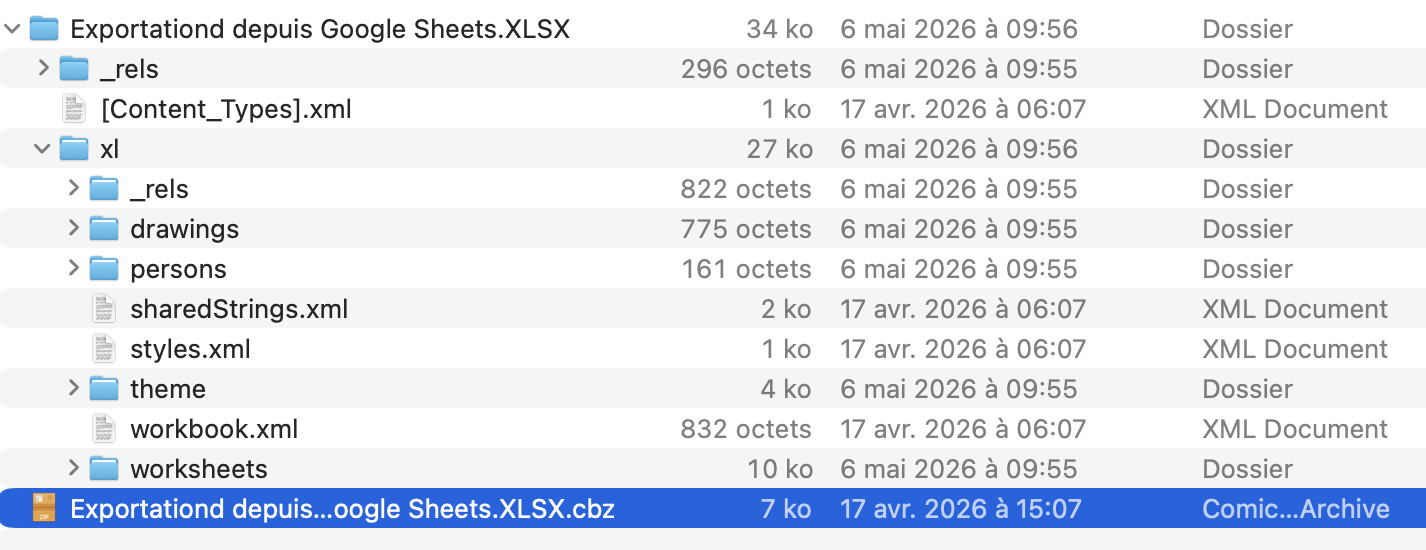
Of course Microsoft Applications are no more my cup of tea. I use some 35 years ago while working at Apple, but stop to use asap.
i also recall that many “simple” systems add xls file extension, but the file is in reality a txt or csv file !
must read the content of this file with a binary editor to be sure
excel will open these kind of files as if they were native xls files.
If you are reading the xml files directly you will have to also read strings.xml which is an indxed list of strings used in the XLSX worksheets.
Unzipping with Xojo’s built in FolderItem.Unzip method works fine.
The worksheet will contain S type cells, whose contents are a number 0-n. Which you have to look up in strings file.
These files can get very large, so reading them with the standard XMLDocument class can cause issues. I use XMLReader instead.
Just to confirm what Christian is proposing. We use this plugin and it is not only reliable with both XLS and XLSX files, it’s much faster than office automation. We used it to convert some very large files and it is so fast you won’t believe it actually did it.
Hi @Beatrix_Willius - I totally agree with you! Unfortunately we’re at the mercy of the upstream system 