i’m importing json files to convert to dictionnaries, sometimes i have a parse error: trailing garbage, with offset value, it’s the position of error in file ? little endian problems ?
thanks
I recommend the use of JSONItem.
The first step in troubleshooting is to test if your JSON source is valid:
Var s As String = "{""start"": ""here""}"
Var r As New JSONItem
Try
  r.Load(s)
  MessageBox("String is JSON")
Catch err As JSONException
  MessageBox("JSON Error: " + err.Message)
End Try
Kind regards, Andrew
2 Likes
ok thanks, i’m old chool lol, not familiar with try catch
i got error while loading
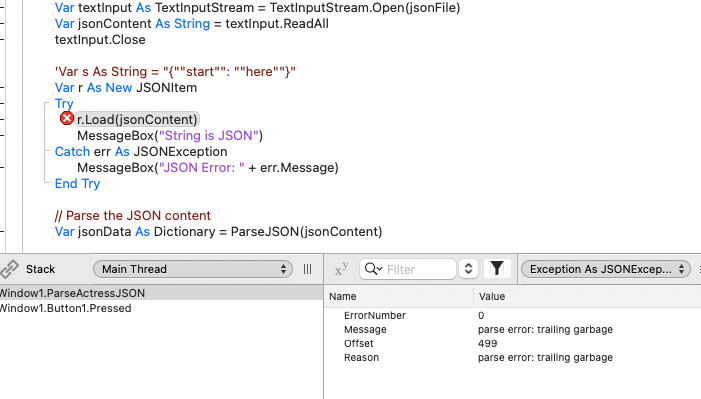
anyway if i have a catch error what should i do ? exit method ? thanks
i should read the doc…
So you likely have valid JSON prior to the “trailing garbage”.
You could loop through the file adding to your string char by char testing its validity on each loop.
As soon as the method returns True, you can continue processing, and never encounter the garbage.
Function IsValidJSON(sourceText As Text) As Boolean
Try
    // Attempt to parse the JSON string into a JSONItem
    Var json As New JSONItem(sourceText)
    Return True // If parsing succeeds, it's valid JSON
  Catch err As JSONException
    // If a JSONException occurs, the string is not valid JSON
    Return False
  End Try
End Function
Kind regards, Andrew
1 Like
Your text may have an unicode character in front to indicate text encoding.
so if asc(Left(text,1)) = &cFEFF then you may remove the first character.
1 Like
i’m close !i’ve asked claude
what is ascii value &cFEFF?
The value &cFEFF appears to be a hexadecimal representation of the Unicode character U+FEFF, which is the Byte Order Mark (BOM).
Here are the key details:
Unicode Code Point: U+FEFF Decimal Value: 65279 Character Name: Zero Width No-Break Space (historically), now primarily used as Byte Order Mark Purpose:
- Used at the beginning of text files to indicate the byte order (endianness) of the text
- Also indicates the encoding format (UTF-8, UTF-16, UTF-32)
In different encodings:
- UTF-8: EF BB BF (3 bytes)
- UTF-16 BE: FE FF (2 bytes)
- UTF-16 LE: FF FE (2 bytes)
- UTF-32 BE: 00 00 FE FF (4 bytes)
- UTF-32 LE: FF FE 00 00 (4 bytes)
The BOM is invisible when displayed but can cause issues in some contexts, particularly when processing text files or web content where it might appear as unexpected characters or cause parsing problems.
Is this character causing issues in a particular context you’re working with?
me : yes, in json file, it says “trailing garbage” when i import it in app
The BOM (Byte Order Mark) at the beginning of your JSON file is causing the “trailing garbage” error because JSON parsers expect pure JSON data without any additional characters.
Here are several ways to fix this:
Quick Fixes:
1. Remove BOM in a text editor:
- Open the JSON file in a capable text editor like VS Code, Notepad++, or Sublime Text
- Save the file with “UTF-8 without BOM” encoding
- In VS Code: Look at bottom right corner, click on the encoding, select “Save with Encoding” → “UTF-8”
2. Use a hex editor:
- Open the file in a hex editor
- Remove the first 3 bytes if they are
EF BB BF
3. Command line (if on Unix/Linux/Mac):
# Remove BOM using sed
sed -i '1s/^\xEF\xBB\xBF//' yourfile.json
The easiest solution is usually to re-save the file with “UTF-8 without BOM” encoding in your text editor.
me : this doesn’t work # Remove BOM using sed sed -i ‘1s/^\xEF\xBB\xBF//’ yourfile.json
funny been chating with claude,
it turns out it’s not BOM stuff, been strugling to remove tail, well i’ve something about encoding, it turns out when i run
python3 -m json.tool yourfile.json
it’s a problem i can see a red coma in midle of file, can’t fix it,
Extra data: line 44 column 6 (char 1254)
well i’ve learn a lot, but 2 hours late lol
I’ve run into Unicode BOM issues on a number of occasions - it usually results from strings that have no defined encoding because they came in from a binary stream or some such. The solution is simply to define the encoding, e.g.
// Norman's CSV Parser uses BinaryStream, which has nil encoding. In order to be able to use the output with JSON
// or TextAreas, the encoding must be defined.

  For i As Integer = 0 To Values.LastRowIndex
    Values(i) = values(i).DefineEncoding(Encodings.UTF8)
  Next
That would indicate that the json file is malformed. That character should be “escaped”. Where does the json file come from?
Paste your JSON into this site to check it for errors.
It’s also really valuable to have a good JSON viewer locally. Personally I’m a fan of Dadroit JSON Viewer.
If it’s not a BOM issue and an actually malformed JSON entry then you’ll need to fix it as a string before converting it to a JSONItem.