EndOfLine Adding extra blank line

// Variable Declarations
'Var sLineEndNo As String = txtDetails.Text'.ReplaceLineEndings( "" )

// The code... the code that should work!
If( txtDetails.Text = "" )Then
  txtDetails.Text = Me.Text
Else
  txtDetails.Text = txtDetails.Text + Me.Text + EndOfLine
End If

Me.Text = ""

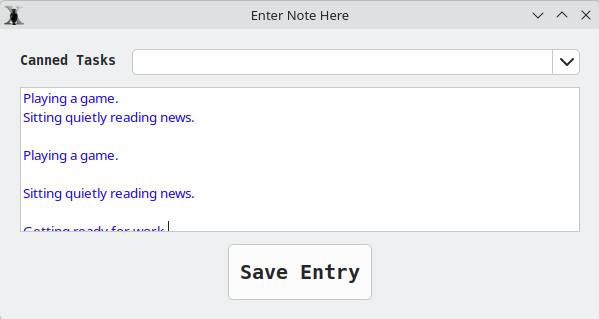
The code and a screen shot of the issue. The first 2 lines are as wanted, then the following lines have a blank space that I dont want.

Hi,

See from the documentation https://documentation.xojo.com/api/text/endofline.html#api-text-endofline-usage

You did not specify the OS you are working on. As you can see, on some OSs, EndOfLine adds a corriage CR/LF and others a single CR. That may explain the additionnal LF.

The control that displays the contents of txtDetails probably extends CR into CR/LF by itself, so CR/LF will add a cecond LF.

Linux, that"a all I use or write for. I’ll read up.

How is your code triggered? I’d guess, it is the code line Me.Text = "" that adds the empty line to TextDetails.

I don’t know what the contents of Me.text is, but if you may want to use TrimRight on it to remove any line endings/white space characters at the end of it.

If( txtDetails.Text = "" )Then
  txtDetails.Text = Me.Text.TrimRight
Else
  txtDetails.Text = txtDetails.Text + Me.Text.TrimRight + EndOfLine
End If

Me.Text = ""

If Me is a TextArea | TextField, this code clears the Control Text contents.
Unless Xojo recent change…

BTW: Isn’t that an API I code ?

Thank you, I’ll give the TrimRight a try and see if that resolves the problem.

The code is triggered by a ComboBox.TextChanged event. The ComboBox is loaded via code with pre-select statements that I can use to fill a TextArea with. Sometimes there is only one selection other times I might make 4 or more.

Okay, so I tried Trim, TrimRight and both give the same result. A single line with no carriage return. I am really stumped why this is not working as planned.

Using Linux. I specified all the various return types just to see if that would solve the problem. It does not. What does not make sense is the first two lines are exactly as expected, but when I add a third line or more the results add an extra blank line.
Me.Text is a ComboBox

Ok, and assigning to Me.Text triggers the TextChanged event, or doesn’t it?. On the other hand, I wonder why you don’t get an infinite loop …

You might want to suppress adding text to txtDetailsif Text is empty. And don’t reset the text, even if it is empty already.

I just figure out where the blank line is coming from… derp! When I set the value Me.Text to “” it triggers the event again. Problem solved,