Hi all, I’m running a dual boot system with Windows 11 and LInux Manjaro. I’m using Xojo 2025 2.1 and creating a desktop application.
The recommended calls are not returning the correct scale factor. See below:
s = DesktopDisplay.DisplayAt(0).ScaleFactor
In Windows, the return value is correct no matter what the settings value is. However, in Linux, the scale factor is truncated. For example, if the scale factor is set to 2 or 1 in Display Settings, the above function returns either 2 or 1 respectively. However, if the scale factor is set to 2.25 or 1.75, the above function returns 2 or 1 respectively. The decimals are truncated.
This is creating havoc whenever display settings are changed because the correct available height cannot be calculated.
Also. DesktopDisplay.DisplayAt(0).Height and DesktopDisplay.DisplayAt(0).AvailableHeight return the same value which is the display height not considering the scale factor.
Any thought on how to remedy this and correctly calculate these values. Much appreciated.
There are a couple of issues when retrieving the scale factor on Linux, the scale factor is an integer (1, 2, etc.). The way to get fractional scaling is to use declares and calculate it. Here is code that works on my Raspberry Pi (Linux Raspberry Pi OS). I don’t know if this will work on Linux Manjaro, and maybe give it a try
Declare Function XOpenDisplay Lib "libX11.so.6" (display_name As CString) As Ptr
      Declare Sub XCloseDisplay Lib "libX11.so.6" (display As Ptr)
      Declare Function XDefaultScreen Lib "libX11.so.6" (display As Ptr) As Integer
      Declare Function XDisplayWidthMM Lib "libX11.so.6" (display As Ptr, screen_number As Integer) As Integer
      Declare Function XDisplayWidth Lib "libX11.so.6" (display As Ptr, screen_number As Integer) As Integer

      // Open X11 display
      Var display As Ptr = XOpenDisplay(Nil)
      If display = Nil Then
        MessageBox("Error: Could not open X11 display. Are you running under Wayland or headless?")
        Return
      End If

      // Default screen
      Var screenNum As Integer = XDefaultScreen(display)

      // Read dimensions
      Var widthPixels As Integer = XDisplayWidth(display, screenNum)
      Var widthMM As Integer = XDisplayWidthMM(display, screenNum)

      // Compute DPI and scale
      Var dpi As Double = widthPixels / (widthMM / 25.4) // pixels per inch
      Var scaleFactor As Double = dpi / 96.0

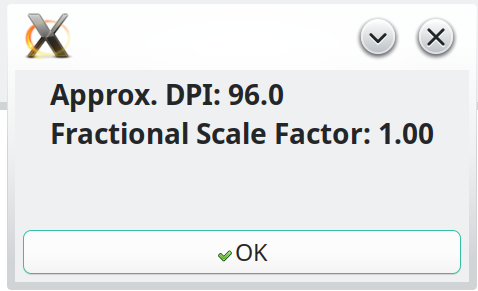
      MessageBox("Approx. DPI: " + Format(dpi, "0.0") + EndOfLine + _
                 "Fractional Scale Factor: " + Format(scaleFactor, "0.00"))

      // Clean up
      XCloseDisplay(display)
Thank you Eugene for your response but I have no idea where to place this code or how to use it. Having never created or used a Declare Function, I don’t know where to start. I can kinda follow what your code is doing and would most likely be able to figure out any necessary changes. Could you kindly provide a little direction on how to get started. Thx in advance.
Here is the Method I currently have that is determining various screen sizes:
FormDefineSizes()
// define element sizes #If TargetWindows
…
#ElseIf TargetLinux
// Note: gDisplayFactor is a Property of type Double
// device resolution as per settings
DisplayWidth = DesktopDisplay.DisplayAt(0).Width
DisplayHeight = DesktopDisplay.DisplayAt(0).Height
// resolution as displayed on screen as updated by display factor
ScreenWidth = Round(DesktopDisplay.DisplayAt(0).AvailableWidth / gDisplayFactor)
ScreenHeight = Round(DesktopDisplay.DisplayAt(0).AvailableHeight / gDisplayFactor)
// FYI, DesktopDisplay.DisplayAt(0).Width and DesktopDisplay.DisplayAt(0).AvailableWidth return the same value.
My currenty settings are 3840 x 2160 and the scale factor is 1.75. My application was working and looking fine when the scale factor was 2.0 but I thought I should see what happens when the settings are different. Ouch! DesktopDisplay.DisplayAt(0).ScaleFactor returning an integer really messed things up.
Attached is a zipped file containing the ScreenFactor Xojo 2025 r2.1 example of the code that I posted. Unzip the file and run the Xojo file on your Linux box and it should display the scale factor in a message box when you press the button.