There is really just one point at which you should call DefineEncoding, and that is when you have just received text from outside Xojo, be it by reading from a file, fetching data from a database, receiving text through the internet or whatever. And if you have specified the encoding in the Encoding property of your TextInputStream you don’t even need to (and shouldn’t) call DefineEncoding at all.
Calling DefineEncoding at some later stage is either superfluous or wrong and it’s bound to create problems later on.
superfluous yes, but later problems? I was not aware. While i don’t know how strings are handled internally in xojo, i assume there is a tag associated with a string that informs of the encoding, so that the bytestream is interpreted correctly into characters. i can’t see how setting this tag again would cause issues.
I will try to prepare a stripped down project and post.
DefineEncoding should only be used when you are working with a string whose encoding hasn’t been set. For example, if you read some text from a BinaryStream, Xojo has no way to know what the encoding of the string is, and you need to use DefineEncoding.
Once a string has an encoding, all[1] descendants of that string will have proper encodings. You don’t need to go back and use DefineEncoding on them. In fact, using DefineEncoding to force a string to have an encoding is a good way to damage a string that isn’t actually in that encoding. For example, the following will produce an invalid or damaged string:
Var someUTF8Text as String

someUTF8Text = “💩💀🎃” //String literals are UTF8 in xojo

Var damagedString as String

damagedString = DefineEncoding(someUTF8Text, Encodings.UTF16)
damagedString will be damaged because you are telling the computer to take these UTF8 bytes and interpret them as UTF16.
Contrast this with ConvertEncoding:
Var validUTF16String as String

validUTF16String = ConvertEncoding(someUTF8Text, Encodings.UTF16)
ConvertEncoding does what it says: it takes the UTF8 characters and re-encodes them as UTF16 bytes[2]. Xojo uses UTF8 internally, so ConvertEncodings is most often used when Xojo is interacting with another system that uses a different encodings (for example, the Windows API famously used UTF16 for many years and Xojo would need to convert to that encoding to use Declares).
In your case, there’s a lot going on, and I look forward to the sample project. Text encodings do tend to trip people up and there can be some subtle frustrations.
This does not apply to manipulations and extractions that operate on the bytes of the string; this can produce a string with an invalid encoding. All of the “normal” non-byte-oriented Xojo string operators preserve encodings. ↩︎
This is not always true, because not all text encodings can represent all characters. ASCII cannot represent ñ, for example. ↩︎
I can see how ConvertEncoding might alter the actual bytestream, but assumed DefineEncoding only changes how the bytestream is interpreted, w/o altering the bytes, but maybe i’m wrong.
It’s possible that this would work, but I wouldn’t count on it being defined behavior. The only input to DefineEncodings should be a string with a null encoding.
Besides, note that DefineEncodings returns a new string. Strings in Xojo are immutable – anything you do to them results in the creation of a new string object, and frequently this also means the destruction of the old one because there are no further references to it. And most calls to DefineEncoding look like this:
OK here is a stripped down version, make sure the output files are beside the project and just press the button, see my comments. And Carsten your hunch was correct: resetting the font after setting new field text also solves the issue. But there is an issue.
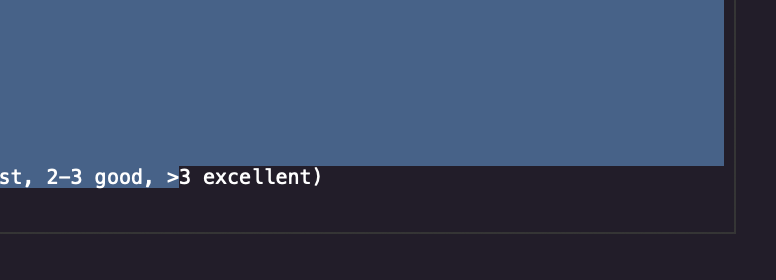
This is unrelated, I think, but still odd behavior. Does anyone else see the “3 excellent)” portion of the text at the very end not get selected if you do a select all?
Jared, I suspect that the selection anomaly is part of the same issue ie character spacing vs pixel location calcs are off, but who knows.
Regardless, seems that either 1) clearing the field before writing to it or 2) resetting the fontname after every field write, seems to mitigate the issue.
And i find each new macOS release is worse than the previous for reliability and stability. So it’s a constant battle of “what’s the least disruptive combination that kinda works for most things”.
I can understand Peter’s concern here, because his point of view is never discarded with a solid answer.
This is similar to the “don’t use DoEvents in GUI apps because it may cause bad behaviours” opinion, where some users are actually using DoEvents and, so far, it worked (don’t intend to start a debate here, I’m just showing the point of view of those who try). Then some say “you shouldn’t” but there’s just no 100% reproducible case showing that it indeed fails. This applies to several others things in Xojo and in programming.
If something works on practice, even if the theory says you should avoid it, I can see how hard it is to be convinced, especially when there’s no stronger answer than “the theory says so”.
(I’m not arguing against you, Eric; I have the same opinion than yours here. Just saying that I understand replies like Peter’s).
OMG a dream come true! In fact SL is really the last macOS that was solid and i’ve been fantasizing of its return ever since!
But i’ll believe it when i see it: to satisfy markets, it seems the temptation for a never-ending stream of dubiously useful new features and eye candy is so strong that reliability and stability are sacrificed at this altar.
Just yesterday I could show you how my macOS Sonoma Finder displays those remote Linux-hosted .gtemp files as folders! (and Terminal shows they are certainly files). And this is the Finder 25 yrs after OS X’s release???
Thanks everyone for your input, at least this one has a workaround, the marginless text fields do not, at least not easily, at least not without upgrading, with the inevitable headaches that will follow. So it goes.