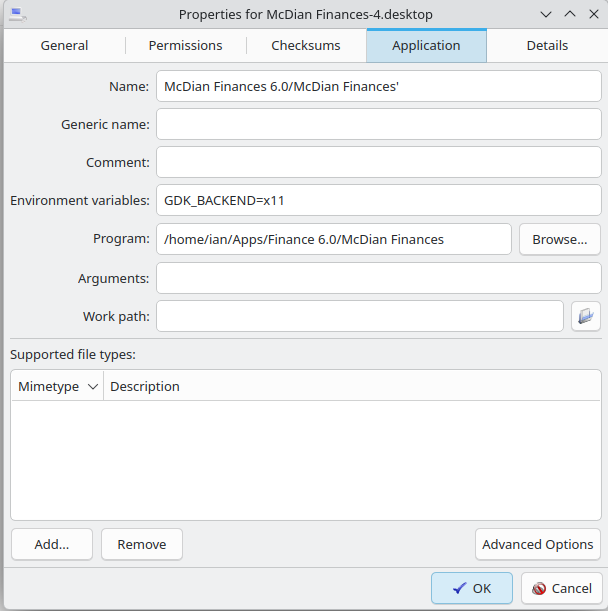
This worked just fine in the older system but I recently upgraded to the latest LTS which uses Wayland for graphic interface and the 7.0 kernel. Now the window that has the above location code, defaults to the middle of the screen. Is there a way to get my window to place where I want… without having to move it every time I open it.
That is Wayland …. you can switch back to X at login .. icon on the lower right of login, maybe
Every program you start, is in the middle of the screen, I was using Gambas before xojo and I had the same problem with Wayland, and no one had a fix for it .. depending no your distro and desktop, you might be able to change to X.
It seems that many distors and desktops are switching to Wayland as the default … I guess that Wayland is becoming the future .. Does that mean that Xorg is going to die ???
Yup, it’s been on the chopping block for a while. I do like the crisp speed of Wayland and there is more control over the visuals. X is old and dated, isn’t scaling as well with new hardware capabilities. Kind of how a lot of the kernel is being changed from C to Rust for stability and security reasons. Although stability is something I have never really complained about with Linux in the 27 years I have been using it.
You can also use GDK_BACKEND=x11 (GDK_BACKEND=x11 /path/to/your/application) which will allow your Xojo desktop app to call x11 functions inside of a wayland desktop environment using xwayland. Then your window placement should work.
I also wrote a module that for both Ubuntu and KDE that can move the screens by using DBus.
Interesting. Would this parameter allow to use the Keyboard.AsyncKeyDown function, which currently fails in Wayland?
(I don’t have a Linux OS at hand to try right now)
I just tried on a Gnome based distro and using GDK_BACKEND=x11 allows Keyboard.AsyncKeyDown to work. There are some settings usually in the security settings of the distro that enable or disable xwayland compatibility and/or things like global clipboard and keyboard access. I have found that most distros default these settings to on/enabled so just adding the GDK_BACKEND=x11 is enough to enable missing features.
I have found a few inconsistencies when operating like this, mainly around graphics like:
That being said, it seems that xwayland fixes a lot more issues than it breaks. In some cases my applications would be completely useless without it due to issues like:
I have spent the last 10 years fighting with Xojo on linux and have made many bug reports, some have gotten fixed, while others are stuck in limbo. Please let Xojo know if any of these issues affect you as well and maybe we can get some traction on them.
Thanks for your answer and for having tried.
This will certainly improve one of my apps, soon.
Well done.
I did, for the keyboard.AsyncKeyDown function, but it was closed because that’s expected in Wayland.
I don’t use Linux enough to create much issues for it, sadly.