I am building a desktop app and I keep running into this question.
For example I add a Radio Button control and when I look at the documentation for Radio Button it says that the “Radio Button” is depreciated and I should use " DesktopRadioGroup". I do not find “DesktopRadioGroup” in the Library. So my question is: How do I use “DesktopRadioGroup” or any of the other new “Desktop” controls?
xojo did a LOT of renaming with not real improvement, just different names and a lot of problems, bugs and confused users.
If you are using xojo 2021r3 or newer and start a new proyect, the controls are already “Desktop” controls even if the Library does not say “Desktop” (yeah, genius!  )
)
To be sure, select a control and look for the “Super” name, it should have the “Desktop” name…
1 Like
But, if your project have been created with older Xojo version, you cannot. IMHO.
As said before, newer Xojo versions use Desktop controls (they were not available in older versions). To see if your control is Desktop or not, add the control to your Window, select the control, click Inspector and check the super, if it starts with Desktop is a desktop control
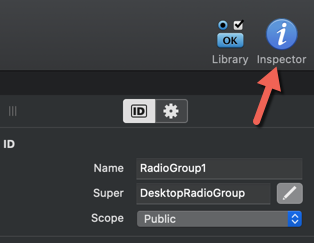
If you are starting projects with Xojo, all your controls will be Desktop (if your target is Desktop).
Edit: a blog post of why Xojo uses Desktop…, Web… and Mobile…