Xojo, if you think at new comers, you (no, that person) have a problem.
I created an image to let you know what is the problem:

Explanation from left to right:
a. The DateTime icon in the Control view
b. The DateTime Control when in your window,
c. The Graphical Display Property set to True
and what it looks alike in the window
d. The real Graphical look of the DateTime Control.
NB: The last representation (d) is after you resized the Control in the WIndow. Do you realize how great it is ? Look the anchors… Same apply when you set the Width and Height values. This is a bad behavior.
In clear, the new user do not know a Graphical display exist:
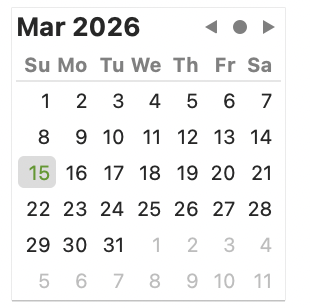
You may say: “but only until the idea to change the Graphics Property”.
NO: until the idea to enlarge the Control from the Window and see how nice it is.
Even in the documentation - last time I checked - this is not displayed.
AT LAST: it is a good idea to add a screen shot of the Graphics mode in the documentation
AND ALSO: when a user change tehe Graphical Display Property to True, display the new Graphical Display intead of what you actually show and resize the Control to its size (so it will be completely visible) instead of partial or TOO large.
As usual, if you are happy with a bad behavior | design, it is your problem, I know how to display that property.
Time for meal…