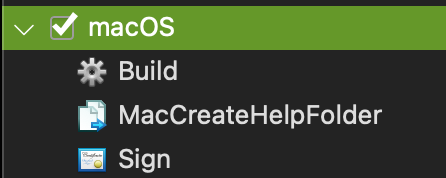
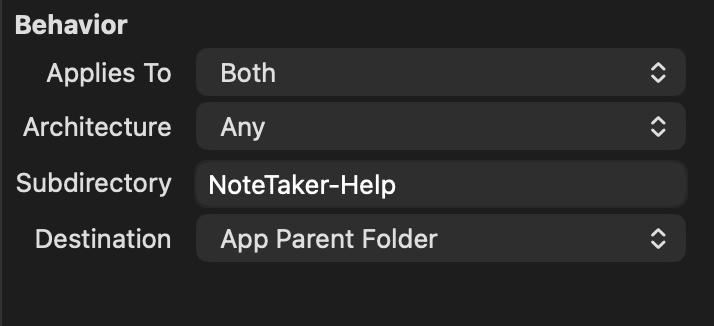
I’m not quite sure what I am doing incorrectly. I’m using Xojo 2026 R2 on macOS Tahoe 26.5.2.
As part of the Build step, I have a copyfile set up which creates two folders (one nested within the other) and then copies (at least it’s supposed to) the files from the source folder into those two folders.
When I run the application within the IDE, everything works just fine, however when I perform a final build and I run the app, the folders and files aren’t copied to the application build folder.
For grins, I went ahead and compiled for Windows and Ubuntu and the files copy just fine to their respect app build folders for those two operating systems.
Am I missing an additional step for macOS?
Try the Resources Folder as Destination. macOS is very opinionated where stuff should be.
1 Like
Resources is good for all platforms.
CAVEAT - If you are ever using SpecialFolder with named folder Documents in Windows, be aware of a wrinkle with OneDrive – frustrated users delete the OneDrive folder instead of uninstalling it the correct way, and Xojo apps using the named directory will encounter a Nil error, so you need to have the app check for the existence of Documents and then redirect any Nil error process to opening a dialogue for users to manually select the correct folder, or use Resources as a backup directory for when Docs comes up Nil.
Uninstalling One Drive ? Good luck, that crap keeps coming back. Microsoft forces the OneDrive to be present and redirects Documents to OneDrive 
1 Like
There’s a process that has to be followed correctly.
- Install OneDrive, unlink your computer FROM OneDrive.
- Uninstall it, do not just delete.
This article is what I used to effect a full uninstall in my own computer.
You have to follow the process that M$ provides. Otherwise it’s a zombie.
I did it on my own machine.