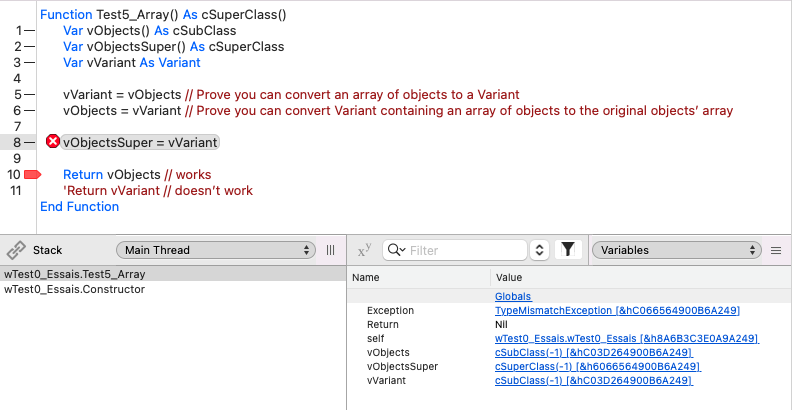
When using the Return statement, the conversion of a subclass of an empty array doesn’t work.
Function Test_Array() As cSuperClass()
  Var vObjects() As cSubClass
  Var vVariant As Variant

  vVariant = vObjects // Prove you can convert an array of objects to a Variant
  vObjects = vVariant // Prove you can convert Variant containing an array of objects to the original objects’ array

  Return vObjects // works
  Return vVariant // doesn’t work
End Function
But if I do the same with just an object, all works well…
Function Test_Object() As cSuperClass
  Var vObject As cSubClass
  Var vVariant As Variant

  vVariant = vObject
  vObject = vVariant

  Return vObject // works
  Return vVariant // works
End Function
This limitation is written no where in the doc. Is it a bug, as I am assuming?
In the second example, Xojo can test the variant’s value directly and see that it is an object of type cSubClass, which is a subclass of cSuperClass and thus can be returned.
In the first example, Xojo looks at what you are trying to return and sees a single object of type Variant. This doesn’t match the return signature (array of object cSuperClass) and so you get a TypeMismatchException. Xojo isn’t willing to peek inside the variant itself to see what it represents.
Arguably, it should be able/willing to do this, but it isn’t. For other possible values inside variants, like integers and strings, the variant object provides automatic conversions between those types and so you can use them as return values in all sorts of functions. There (apparently) is no automatic conversion to arrays and so you get the exception. I venture to guess this is because of Xojo’s strict type constraints that it can’t or won’t provide the appropriate conversion mechanism.
Can we agree that an object subclass IsA object superclass?
This logic should also apply to Arrays of…
But I understand that an Array is itself, in Xojo, also an object of a class Array, and it would require more code to confirm that the array IsA subclass of the array returned…
I now see that the problem is not only with the Return statement, but also in code…
You’ve wandered into the dark corner of the basement where Variant and Array both live. I generally avoid Variant unless absolutely necessary, because things can be going along just great until you run into one of these weird situations where Variant won’t quite give you what you need, and you end up restructuring a bunch of code. I’ve generally found it better to not use them if possible.
One clue that things are about to go wrong is if you try to use Variant to get around Xojo’s strict type checking. It almost always comes back to bite you.
Well, until this special case, Variant were working perfectly for me.
It’s just the special case where I convert an array as Variant to an array of the super class.
Since I have more than 100 subclasses of that particular type, it would be complex for me to bypass that. Not impossible, I can write my own Array object… But since nowhere in the documentation it’s written that Variant have this limitation, I hope it’s just an oversight that they will fix in, let say, v2024r3?
I’m not sure that this is a bug, exactly, so it’s hard to say how urgent Xojo considers it. Perhaps you could search the issue tracker to see if anyone else has filed an issue and sign on to it.
Let’s take a step back and look at the larger picture. You’ve got a SuperClass, and over 100 subclasses. You’re running into this Variant/Array problem. What are you actually trying to accomplish? Maybe there’s a way to do it that doesn’t involve Variants.
“Favor composition over inheritance” is a design principle that suggests it’s better to compose objects to achieve polymorphic behavior and code reuse rather than inheriting from a base class .
Yes. In my project, I already have 3 arrays classes, and I dont even use the Operator_Subscript. I just expose the array in a method with ByRef parameter. It spares me from overloading a lot of methods.
Each subclass have it’s property defined as Setter/Getter, and also have some commands.
It would be too generic.
Subclassing does give me the right mix of genericity and personnality.
And it exists for that. Why not use it? And it’s not like I’m abusing the concept.
A one-dimensional array (or array) is a data structure that stores a sequence of (references to) objects. We refer to the objects within an array as its elements. The method that we use to refer to elements in an array is numbering and then indexing them. If we have n elements in the sequence, we think of them as being numbered from 0 to n - 1. Then, we can unambiguously specify one of them by referring to the ith element for any integer i in this range.
A two-dimensional array is an array of (references to) one-dimensional arrays. Whereas the elements of a one-dimensional array are indexed by a single integer, the elements of a two-dimensional array are indexed by a pair of integers: the first specifying a row, and the second specifying a column.
Ho would i target Index Y of Element X in such an Array? If Array(2, 3) <> ... ← Looks like a multidimensional array to me.
Would I always have to reference or copy the array element into a new array in order to access its index? Doesn’t sound very effective.
Dim aBunchOfArrays() as variant

Dim oneArray() as string

oneArray.Add "banana"
oneArray.Add "orange"
oneArray.Add "apple"

aBunchOfArrays.Add oneArray

Dim anotherArray() as string

anotherArray.Add "cat"
anotherArray.Add "dog"
anotherArray.Add "llama"

aBunchOfArrays.Add anotherArray

dim someArray() as string

someArray=aBunchOfArrays(1)

//someArray(1) will be "dog"

someArray=aBunchOfArrays(0)

//someArray(0) will be "banana'
So, as expected, you would have to reference each array again just to be able to access elements of this array. That sounds ineffective.
I’m sure one or two people would have a use for it… but it’s not for me.
I’m still convinced that we’re talking about multidimensional arrays.
Arrays are treated as objects so be aware that assigning an array to another variable or passing an array as a parameter does not make a copy of the array.Instead you get a new variable that points to the original array so any changes you make to the "2nd" array also affects the first array. If you need an actual copy of the array you will have to manually copy its values using a loop.