Chart Bar mode not appears, always line

hi guys, i have no ideia what i’m doing wrong here. i’m running xojo 4.2 on Mac.

// Generate the Chart
ChartAtividadesHoje.RemoveAllLabels
ChartAtividadesHoje.RemoveAllDatasets

Var PontosInt(6) As Double
Var PontosLabel(6) As String
Var ds As New ChartLinearDataset(“Pontos (1 semana)”, Color.Blue, True, PontosInt)

For i As Integer = 0 to ListBoxMeta.LastRowIndex
//MessageBox ListBoxMeta.CellTextAt(i,1)
//MessageBox ListBoxMeta.CellTextAt(i,0)
if i < 6Then
PontosInt(i) = Val(ListBoxMeta.CellTextAt(i,1))
PontosLabel(i) = ListBoxMeta.CellTextAt(i,0)
End If
Next

ChartAtividadesHoje.Mode = DesktopChart.Modes.Bar
ChartAtividadesHoje.AddDataset(ds)
ChartAtividadesHoje.AddLabels(PontosLabel)
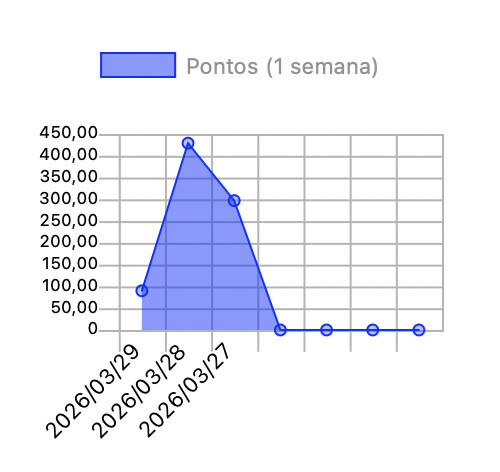
Hi @Andre_Cardoso,

You need to set the chart type on the DataSet:

ds.ChartType = ChartLinearDataset.ChartTypes.bar

Tks man. works fine. I was trying to set this in the “Control” and not in the item that was created.

Yeah… it seems odd. It went back to the days where Chart was available only for Web projects.

Setting the chart mode between Line / Bar really involves mostly how the data (data sets) are displayed… specially when line and bar datasets are displayed on a same chart.

For example, in this case the chart is set to bar, while one of the datasets chart mode is set to Line, and the second one to Bar. In this case, you can see the bars are displayed at their full width, while the first point of the line dataset is offseted.

In this second example, the Chart is set to Line. Here you can see how the first value for the Bar dataset has half the width, while the first value of the Line dataset is not offseted: