I have an application that supports a few different types of data that will be written to different elements in an XML file. That data changes, depending on what the element type is. For example: If you are editing a “Timecode” element, where the content of the text is generated by another application, the only thing you can change are text display attributes: size, color, background color, transparency. But if you’re editing a Custom Text element, you can do all of those plus there’s a text field to edit the text. For another, you would select an image from the filesystem, and you can adjust the scale of the image.
These controls appear on one side of my application, and that cluster of controls needs to change dynamically depending on what kind of object you’ve selected to edit.
So my question is: what’s the best way to set this up?
My initial thought was to put each individual control and its label inside a container. Then in another container I’d group the controls needed. I would have 3-4 containers that consist of the correct grouping of individual controls, and these would be grouped within yet another container, where I could turn the groupings on or off.
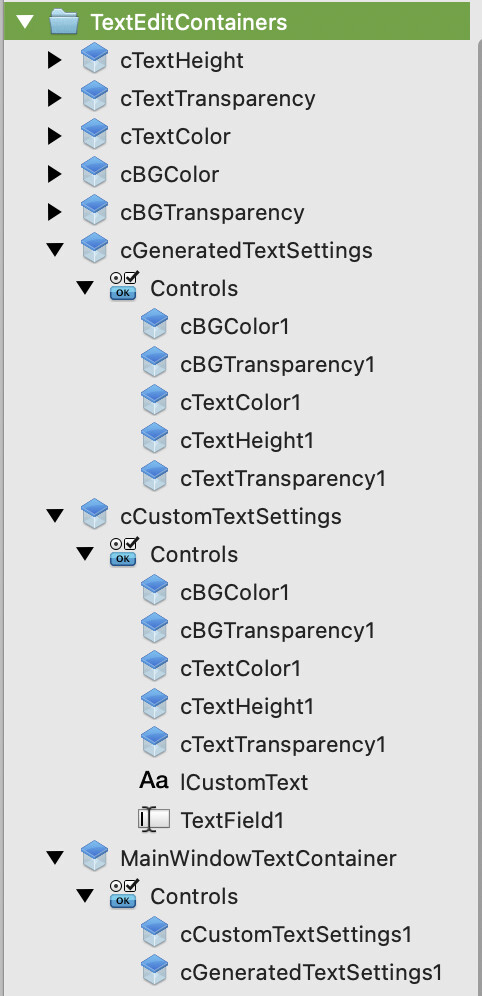
Here, the collapsed containers (such as cTextHeight) each contain one or two control elements and a label: like a slider and a text box to show the slider value, or a button to open a color picker. The expanded containers (cCustomTextSettings and cGeneratedTextSettings) hold groupings of the collapsed containers.
MainWindowTextContainer holds the two (for now, there will be more) grouped control containers, cCustomTextSettings and cGeneratedTextSettings, and would be embedded in the main window. I would then show or hide cCustomTextSettings or cGeneratedTextSettings as needed.
Just wondering if there’s a better way to do this or if this is over complicating things.