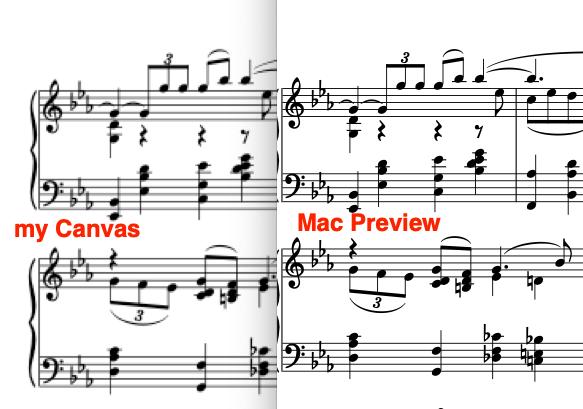
I’m drawing to a Canvas using DrawPicture and PDFDocumentMBS to put a page of PDF on the screen. The meat of the code is below, where “PDFDoc” is a PDFDocumentMBS:
Panel = New Picture(myCanvas.Width,myCanvas.Height)
Panel.Graphics.DrawPicture(Books(CurrBook).PDFDoc.pageAtIndex(page1).render ([long parameter list here])
This image shows my canvas next to Mac’s Preview of the same PDF page. Is there something in the graphics object that I need to set up before drawing? How can I get the good quality of Preview. Am I missing something obvious? I can provide more details but the above code is where the drawing is done. Perhaps there’s something in MBS that I’m missing.
What are the properties of your image ?
Preview: Widh, Height, DPI
Picture: Width, Height, VerticalResolution, HorizontalResolution
Look at the Depth Property too.
Look at Picture in the Documentation for details.
Preview is an application and do all the job for you while Picture (Xojo) is a developer tool: you have to do all of the job by yourself.
This is a good idea to compare, but this is say 50% of the job; the other 50 % is not shows by Preview (Cmd-I to get the Picture Properties in Preview).
By default, a new Picture has a resolution of 72dpi – but since you’re on a Mac, it’s likely that you have a high resolution laptop screen, and 72dpi pictures are going to look fuzzy. Try increasing the resolution like this:
Panel = New Picture(myCanvas.Width * 2, myCanvas.Height * 2)

Panel.HorizontalResolution = 144

Panel.VerticalResolution = 144

Panel.Graphics.DrawPicture(Books(CurrBook).PDFDoc.pageAtIndex(page1).render(144 [other parameters])
Since your picture now has twice the pixel width of your canvas, you need to draw it at half size:
myCanvas.Graphics.DrawImage Panel, 0, 0, Panel.Width/2, Panel.Width/2
Give that a shot and let us know how it works! You can also use a multiple factor of 3 and a resolution of 216 for more sharpness.
The width and height are calculate by the window size and splitter settings. But I think my problem is that I’ve been setting the resolution to 72dpi.
I think this is the problem. I’ve been setting the resolution to 72dpi. I’ll look into this tomorrow. Thanks.
Thanks for your help. I finally got around to dealing with this resolution problem. Doubling it solved it.