It’s not clear to me whether this requires you to be using Visual Code or some specific IDE or whether you can use it to code-sign an arbitrary Xojo EXE that you have built.
Yup - I’ve just changed our Build Pipeline to do Windows CodeSigning with “Azure Trusted Signing”.
Works just fine with Xojo built applications - basically just some other Parameters (Azure Credentials instead of .pfx) for the call to signtool.exe.
It’s actually quite cheap… probably one of the cheapest solutions? At least for the “casual/average users”…
That price is definitely reasonable. However, a Yubikey is only ~$70. If you don’t need the cloud signing features, that’ll pay for itself after the seventh month. I’ll stick with mine, but I’m still glad this service exists.
Wait is that $9.99 on top of the certificate cost? Or is it $9.99 as the total certificate cost? If $9.99/mo replaces the entire cost then yes that’s worth it, otherwise that’s just the cloud signing the others offer.
Where did you get that information (it being an “EV” certificate)?
I honestly don’t know… but since our company has decided to use “Azure Trusted Signing” for all their productes I had to use it for the Xojo built applications, too.
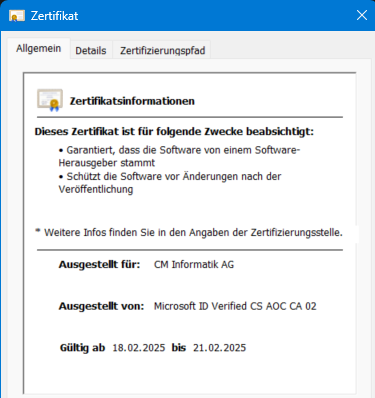
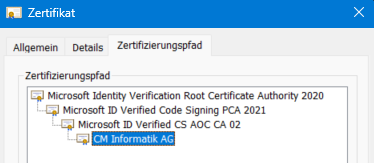
All I can say is that the first download of an .exe with that certificate had been accepted by Windows Smartscreen (which used to take a couple of weeks with “warnings” last time we’ve changed to a different certificate provider). Maybe it’s kind of "it’s provided and certified by M$, so M$ will accept it?
Anyway. All I wanted to say is that “Azure Trusted Signing” definitively works with Xojo built applications, as one can just continue to use e.g. signtool.exe - it’s just invoked differently compared to using a .pfx file such as before. Of course also a lot of other possibilities for those using e.g. GitHub Actions.
And from what I’m seeing (and from what I’ve heard) the pricing sounds very reasonable.
Is this basically the modern equivalent to signing with an EV cert?
Yes. You get instant reputation.
How does smartscreen reputation work? Will I get instant reputation?
Your Azure trusted signing account will start off with a base level of reputation. Reputation now belongs to the code signing identity, no longer the individual certs (as the actual certs are rotated daily and are now an implementation detail).
I’m glad you said something. I went through the process last night and since then I’ve been at the “In Progress” state for validation. Wasn’t sure if there was anything else for me to do or if it’s simply taking longer than the 10 minutes or maybe 12 hours that the blog post wrote about. Guess time will tell…
I’ll be subscribed to you all for updates. I *just*(November) got a new EV certificate. I’m actually wondering how much about this process will change before I even start.
I bought 10 years of an OV certificate last year, but since I use signed download urls, I don’t seem to be building reputation. So I was debating trying to convince ssl.com to allow me to convert my remaining credit (since they issue in 3 year intervals) into a shorter length EV instead. Since ATS seems like the cheapest EV option out there, I figure I’ll just cut my losses. Trying to save money in the long run will end up costing me much more, but you win some you lose some.
If I already had an EV, I wouldn’t bother with this until a few months ahead of its expiration.
I just read your post and chuckled as I’m in the exact same situation. I have a 10 year OV cert too that has maybe 8ish years left on it. In spite of consistently submitting my binaries to Microsoft for malware review, I too continue to not build SmartScreen reputation.
I saw the new developments in this thread half a week ago and made note that one day I might want to pursue this, even though I wasn’t super thrilled over the loss in time and money with my existing cert.
But I got to thinking yesterday afternoon whether or not it’s worth $120 a year (the cost moving forward for Azure Trusted Signing) so that my customers have a more seamless download experience. Looking at things from this angle, I’d be crazy not to spend the money, hence why I started the process last night.
In the end my YubiKey will effectively be a paperweight, but might come in handy as a backup one day if I ever need it. I agree with your sentiments on winning some and losing some, and sometimes this is simply the cost of doing business.
Right. For me, it’s “just” a couple days of income lost. I’m not happy about it, but I can live with it if it means I don’t have to explain to customers about Microsoft’s infuriatingly bad UI design when it comes to approving an OV download.
With my last certificate, I built my reputation up in a matter of days. This time, it doesn’t seem to be happening at all, despite downloads being much higher. Feels like they changed the formula to incentivize EV certificates more.
Great news in that my Identity Validation moved into the Completed state a bit ago so I carried on with the blog post how to. Of course there was a bunch of local things to setup, but I’m now done and can confirm, that everything works per the blog post.
Also from what I can tell, the instant SmartScreen reputation also seems accurate in that I put my newly signed installer into my DigitalOcean download location, downloaded it from Edge within Windows and the binary appeared “normal” without any of the “Are you really sure you want to run this executable” run around.
The other big pro to this setup is that it seems a tad bit faster and it doesn’t have any of the “Enter your PIN” dialogs that the YubiKey has OOB.
The only hiccup that I ran into along the way, was that the Command of the Sign Tool field within the Configure Sign Tools… dialog of Inno Setup, didn’t have enough space for my new signing command and parameters. So I ended up putting the full command into a batch file and having Inno Setup call that instead.
Just to provide guidance for anyone going down this road, beyond the $10 monthly cost involved, plan on about 3-4 hours to get things setup from scratch. I probably spent about an hour and half, maybe two hours, for the first round to get me to the Identity Validation step and today I spent the same, mostly on setting up my Windows signing host.
Thanks for pointing this out and for the discussion. Following the linked guides i was able to use Azure Trusted Signing and signed my first Windows executables. Thats awesome.
Windows 11 was no longer complaining starting the app (downloaded from a web page).
Though: Google Chrome was blocking the download first and i don‘t understand why. The signed app was compressed in a zip and all other executable files (.dll) were signed as well. Any ideas?
Meanwhile, I’m still waiting for something to happen with my identity validations. I tried submitting a second with my EIN instead of my DUNS, but nothing has happened with either.
I was registering as individual (not company) and needed to use the AU10TIX verification service (from germany, using website and iphone and ms authenticator app). After approx 1 hour i got the clearance. May individual vs company makes a difference?
Google Chrome blocked downloading the Visual Studio Installer from Microsoft while I was on Zoom with a client a few days ago. Google is uh, doing their own thing.

 I just read your post and chuckled as I’m in the exact same situation. I have a 10 year OV cert too that has maybe 8ish years left on it. In spite of consistently submitting my binaries to Microsoft for malware review, I too continue to not build SmartScreen reputation.