Hi everyone,
I built Andina Deploy, a Windows desktop app that publishes and manages Xojo Web apps on your own Debian/Ubuntu server, and I would like to share it with the community. If you ever used Lifeboat, the workflow will feel familiar: drop your build, pick a domain, done. Everything runs over SSH from your PC and nothing is installed on your computer’s side of the server except standard packages (nginx or Apache, certbot, systemd services).
Free for one server. Without a license the app works as a full trial with 1 server, no time limit. Paid licenses unlock more servers. The interface, the built-in manual and the first-start guide are in English, Italian and Spanish.
Website and download: https://andinadeploy.andinasoftware.com.co/
Deploying a Xojo Web app
- Drag and drop the Linux build folder (or a .zip) from Xojo onto the Upload App area. The app finds the executable by itself.
- Architecture check before uploading (x86_64 or aarch64), so you don’t upload a build the server can’t run.
- Missing libraries are installed for you (GTK 3, libsoup, libcurl, SQLite, OpenSSL, fontconfig, FreeType, Cairo, Pango and others, using the right package names for your distribution version).
- Differential upload: only changed files are sent (SHA-256), so a new build of a big app is quick.
- Releases with atomic switch: every deploy goes into its own timestamped release folder and the
currentlink is switched atomically. - Health check with automatic rollback: if the new version doesn’t answer, the previous one is restored. Manual rollback is one button.
- Multiple instances with load balancing and sticky sessions (Xojo Web sessions stay on the same instance), WebSocket proxy included.
- Each instance runs as a systemd service under its own system user, started at boot, with a watchdog and an optional scheduled restart.
- Environment variables per app, a persistent data folder that survives deploys, and logs from journald in a window.
- Start, Stop, Restart from the right-click menu; Launch in Browser and Copy Address for the site.
- If something fails while deploying, the app cleans up after itself.
Domains and SSL
- Domain and subdomains, optional www, DNS check before asking for a certificate.
- Free Let’s Encrypt certificates, requested and renewed automatically.
- SSL mode: None, Optional or Force, with grade A+, A or B.
- Max upload size per domain and free-form extra directives.
- An option for servers behind a proxy that handles HTTPS (Cloudflare, Traefik, hosting proxies), which fixes the “too many redirects” loop.
Other sites on the same server
- Static files and PHP sites per domain or path, with PHP version of your choice (7.4 to 8.5, php-fpm, php.ini editor).
- A public folder option, so only that subfolder is served and
config/,src/and keys can’t be reached from the web. - Rewrite presets (WordPress, Grav, YOURLS, Sendy, MantisBT API, Easy!Appointments) and your own rules; custom error pages.
- Remote file manager: sizes, dates, permissions and owner, a Permissions dialog (r/w/x with octal, recursive, presets like “Web read-only”), upload basket for files, folders and zips (zips are extracted on the server), new folder, delete.
- Forwarding: reverse proxy (WebSocket included) or 301 redirect to another address.
Server tools
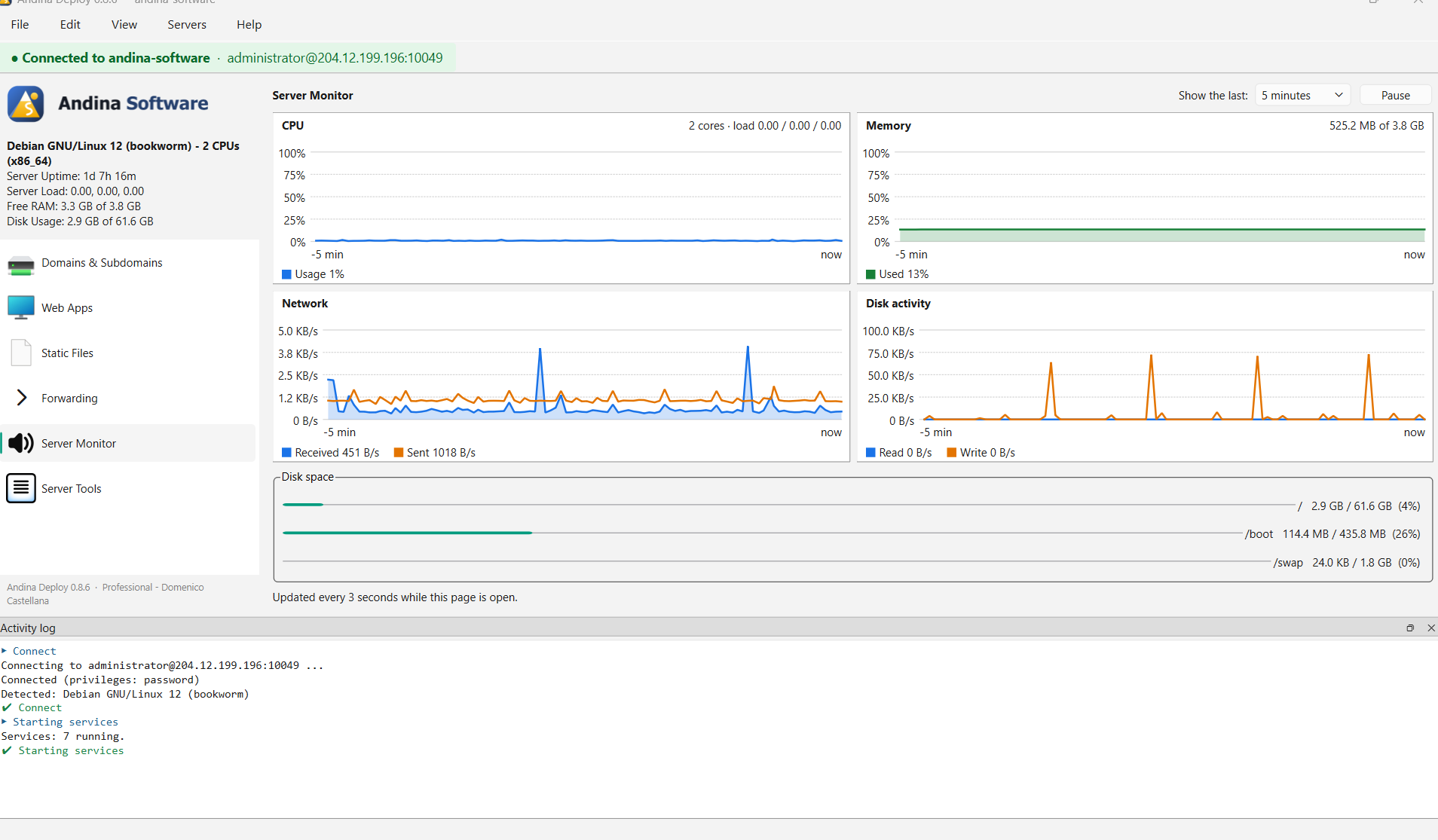
- Server Monitor: live charts of CPU (cores and load), memory and swap, network (received/sent), disk activity and space used per disk. 1, 5 or 15 minute window, pause.
- Web server: nginx or Apache, switchable. Every change is tested (
nginx -t/apache2ctl configtest) and restored from backup if the test fails. Editors for nginx, Apache and HAProxy files with the same safety. - Databases: MariaDB/MySQL, PostgreSQL and SQL Server: install, create databases and users, change the port. Credentials you create are remembered only on your PC, in the operating system keychain.
- Cron jobs editor.
- Backups: daily backups of site folders and databases made by the server itself, keeping the last N days; restore from the app and download to your PC.
- Alerts by Telegram and/or e-mail: site down, disk space, services, certificates about to expire, backups missing (and a message when it’s fixed).
- Logs viewer for the web server with filter.
- Security: SSH keys, bot protection with fail2ban, firewall (ufw), change of the SSH port with verification and rollback.
- Clear caches, date and time zone, fonts (useful for Xojo apps that draw text), software update, restart the server.
- Start-up automation: on connection, installed services are started and enabled; certificates missing are requested.
Working comfortably
- Integrated SSH terminal (tabs, root shell, vim/nano/htop work), or open PuTTY/ssh in its own window.
- The configuration lives on the server, so you can manage the same server from several PCs. Export / Import settings (AES-256 encrypted file) moves your server list and saved credentials to another computer.
- Coming from Lifeboat or a hand-made setup? A read-only scan lists existing sites, services, certificates, PHP, databases and conflicts. You can adopt one site at a time (with automatic check and rollback) or give it back. Andina Deploy only writes files named
andina-*; the rest keeps working. - Flush DNS cache of your PC from the Help menu.
- Automatic updates from the license server (signature, size and SHA-256 are verified before installing).
- Built-in manual and first-start guide in English, Italian and Spanish.
Safety
SSH host keys are confirmed on first use and refused if they change; passwords never appear on a command line; every value you type is validated before it reaches a shell or a config file; configs are tested before reloading and restored if they fail.
Where it stands
It runs on Debian/Ubuntu servers. I tested a real Xojo Web app on a Debian 12 server (deploy, domain with SSL, update with rollback). The installer for Windows is available now; a macOS version is being considered. The installer is not code-signed yet, so Windows SmartScreen may ask you to click “More info” and “Run anyway”.
I would love your feedback, especially: which Xojo versions and Linux distributions you use, and what is missing in your deploy workflow. I’ll answer here.
Download and more details: https://andinadeploy.andinasoftware.com.co/
Thanks,
Sandra – Andina Software