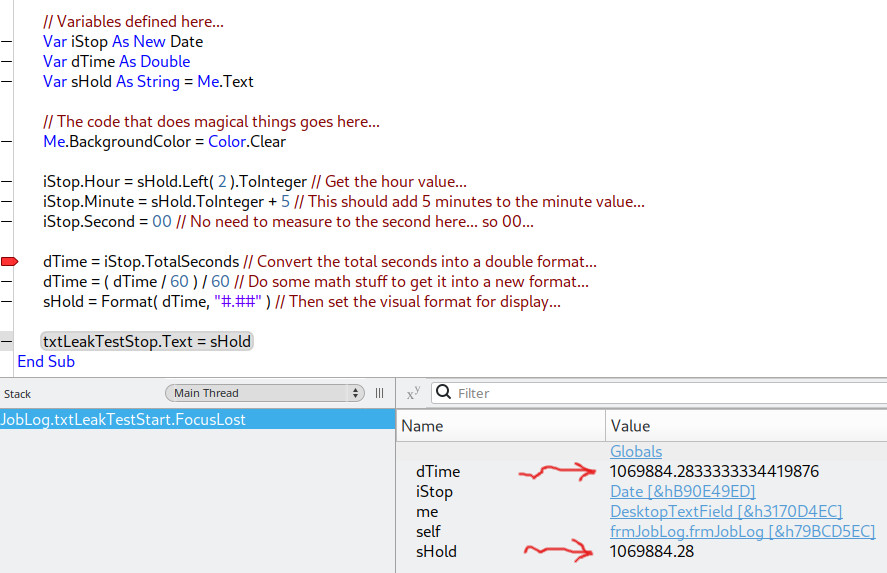
I have a text field that I enter a time value into. And I want to add 5 minutes to that value and have that display in another text field. The problem arises with the final output not being formatted correctly. I am reusing some older code for time which works in the source program, but in this new one it’s not displaying time correctly.
// Variables defined here...
Var iStop As New Date
Var dTime As Double
Var sHold As String = Me.Text

// The code that does magical things goes here...
Me.BackgroundColor = Color.Clear

iStop.Hour = sHold.Left( 2 ).ToInteger // Get the hour value...
iStop.Minute = sHold.ToInteger + 5 // This should add 5 minutes to the minute value...
iStop.Second = 00 // No need to measure to the second here... so 00...

dTime = iStop.TotalSeconds // Convert the total seconds into a double format...
dTime = ( dTime / 60 ) / 60 // Do some math stuff to get it into a new format...
sHold = Format( dTime, "#.##" ) // Then set the visual format for display...

txtLeakTestStop.Text = sHold
Hello,
maybe look at DateTime and AddInterval to make life easier 
DateTime
Or do you have to stick with Date for API1 reasons?
2 Likes
What’s not correct about it? The debugger looks to be showing it as a number of hours since the epoch (in the device timezone) with two decimal places as requested by "#.##" in Format.
Wait… there’s more odd stuff going on here. You’re parsing the original hour value as the first two characters of sHold, but the minute value as the entire value of sHold?
Oh… silly me! I totally missed that! No, I was supposed to get the right 2 values… but… hmm. Good catch! I feel silly for something so simple! Thank you.
Hmm, so I fixed my goof and it’s still not formatting correctly.
It’s formatting correctly, but probably not as you’ve intended.
dTime is (iStop.TotalSeconds / 60) / 60 so it first reduces the seconds since the epoch to minutes, then hours. And then you format the number of hours as a string. Based on the input format, you’re looking for something more like “HH:MM”. You’ll need to format the two values from iStop separately to get that. You don’t need dTime or TotalSeconds at all.
Okay, I found a small issue, but nothing I can’t correct for. Thanks!
Do you need decimal hours? i.e. 6 minutes showing as 0.10?
I would guess, what you want is
sHold = iStop.ToString("m.ss")
with iStop defined as DateTime instead. Or if you want to get ordinary minutes from a Date type, format hours and minutes separately and construct sHold from these formatted values.
Also I am not sure if assigning iStop.Minute = sHold.ToInteger + 5 is safe if the value happens to be greater then 60.
I wrote a small test for that, and it accounts for the >= 60 value.