Hi guys, I need your help.
I have a Xojo 2025r3.1 desktop project for Windows 11; I connect to a SQL Server 2016 database on a server within the company intranet; I use MBS plugins, specifically the SQLDatabaseMBS class.
They asked me to run the project on MacOS as well, and that’s where the trouble begins, because I know very little about MacOS.
I copied the project to my MacBook running Sonora, and now, however, I don’t know how to connect the project to the SQL Server database.
Help!!!
Thank you so much!
Nedi
David_Cox
May 26, 2026, 10:47am
2
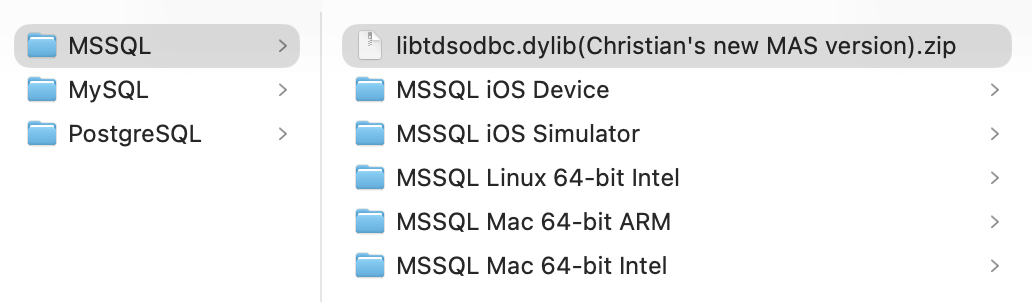
Christian has downloadable plugins for many macOS environments:
Thanks, David, but, as I mentioned in my post, I’m new to MacOS, so if you can help, please show me step-by-step how to connect to the database.
Below is how I connect in the Windows version:
DB_SQLServer = New SQLDatabaseMBS

DB_Host = s(0)
DB_Name = s(1)
DB_User = user
DB_Password = pwd

// connect to database
DB_SQLServer.Option("UseAPI") = "OLEDB"

DB_SQLServer.DatabaseName = "SQLServer:" + DB_Host + "@" + DB_Name + ";MARS_Connection=yes"
DB_SQLServer.UserName = DB_User
DB_SQLServer.Password = DB_Password
DB_SQLServer.Scrollable = False
DB_SQLServer.Option("SQL_ATTR_CONNECTION_TIMEOUT") = "1000"

If Not DB_SQLServer.Connect Then
  MsgBox ClearDbErrMsg(DB_SQLServer.ErrorMessage)
  Quit
End If

DB_SQLServer.AutoCommit = SQLDatabaseMBS.kAutoCommitOn
DB_SQLServer.Option("AutoCache") = "true"
Thank you a lot!
David_Cox
May 26, 2026, 12:35pm
4
You will also need:
If myPort < 1 Then DB_SQLServer.Port = 1433 'the port used by MSSQL
#If TargetiOS Then
#If TargetMobileDevice Then
    libraryFileName = "libtdsodbc.0.dylib" 'two drivers with the same name, but presumably the simulator has debugging code,  'needs testing!
    f = SpecialFolder.Resources.Child("MSSQL iOS Device").Child(libraryFileName)
  #ElseIf TargetMobileSimulator
    libraryFileName = "libtdsodbc.0.dylib"
    f = SpecialFolder.Resource("MSSQL iOS Simulator")
    f = f.Child(libraryFileName)
  #Else
    Break
  #EndIf

#ElseIf TargetLinux Then 'works?
  libraryFileName = "libtdsodbc.so.0.0.0" 'needs testing! probably needs to be in 'odbc' folder inside Resources!
  f = SpecialFolder.Resources.Child("MSSQL Linux 64-bit Intel").Child(libraryFileName)

#ElseIf TargetMacOS Then 'works
  #If TargetARM Then
    libraryFileName = "libtdsodbc.mac.dylib" 'needs testing!
    f = SpecialFolder.Resources.Child("MSSQL Mac 64-bit ARM").Child(libraryFileName)
  #ElseIf TargetX86 Then
    libraryFileName = "libsybdb.5.dylib" 'needs testing!
    f = SpecialFolder.Resources.Child("MSSQL Mac 64-bit Intel").Child(libraryFileName)
  #EndIf

#ElseIf TargetWindows Then 'works automatically in Windows
  libraryFileName = "libtdsodbc.dll" 'needs testing!
  f = App.ExecutableFile 'no file needed, set a dummy

#If TargetMacOS Then
  Var tempSoftDeclareMBS As New SoftDeclareMBS
  Call tempSoftDeclareMBS.LoadLibrary(f.UnixPathMBS)
  myHost = myHost.NthField("\", 1) 'chop off the \SQLEXPRESS if it's there!
  DB_SQLServer.Host = myHost
  DB_SQLServer.SetFileOption(tempSQLDatabaseMBS.kOptionLibraryODBC, f)
  DB_SQLServer.Option("UseAPI") = "ODBC"

  'forum.xojo.com/t/mssql-server-and-sqldatabasembs/78838/2
  DB_SQLServer.Option("ODBC.LIBS") = f.NativePath

  tempString = "ODBC:DRIVER={FREETDS};Server=" + myHost + ";UId=" + myUserName + ";PWD=" + myUserPassword + ";" + databasePlaceHolder + "TDS_VERSION=7.2;Port=" + myPort.ToString

  databaseCode = ";Database=" + myDatabaseName + ";"
  DB_SQLServer.DatabaseName = tempString

#ElseIf TargetWindows Then
  DB_SQLServer.Option("OLEDBProvider") = "SQLNCLI" // SQLNCLI for SQL Server 2005, SQLNCLI10 for newer version. Works.
  DB_SQLServer.DatabaseName = "SQLServer:" + myHost + "@" + databasePlaceHolder

  databaseCode = myDatabaseName

#ElseIf TargetLinux Then
  'forum.xojo.com/4237-mac-ms-sql
  Var tempSoftDeclareMBS As New SoftDeclareMBS
  Call tempSoftDeclareMBS.LoadLibrary(f.UnixPathMBS)
  myHost = myHost.NthField("\", 1) 'chop off the \SQLEXPRESS if it's there!
  DB_SQLServer.SetFileOption(tempSQLDatabaseMBS.kOptionLibraryODBC, f)
  DB_SQLServer.Option("UseAPI") = "ODBC"

  tempString = "ODBC:DRIVER={FREETDS};Server=" + myHost + ";UId=" + myUserName + ";PWD=" + myUserPassword + ";" + databasePlaceHolder + "TDS_VERSION=7.2;Port=" + myPort.ToString
  databaseCode = "Database=" + myDatabaseName + ";"
  DB_SQLServer.DatabaseName = tempString
#EndIf
Hi David, with a little effort I copied what I thought was right to get the program to work, and it works!!
Thanks so much, good job!!