Okay, this is making me nuts! So I have a window that is used to review readings. And I have two buttons set up. One to increment forward and one to decrement backwards through a recordset. BUT everytime I click either button another window ( the one that is used to get the input ) opens, even though I have no code in the button explicitly calling to open the window! This is a new issue and it’s driving me nuts!
This is the code for the NextRecord Button
// Variables defined here..
Var i As Integer = lblRnum.Text.ToInteger // Get the displayed image number for increment...
Var rsCnt As RowSet = dbMeters.SelectSQL( "SELECT * FROM tblReviewReads WHERE statusOf=?", "A" ) // Get the record count...
Var iRecCnt As Integer = rsCnt.RowCount // Put it into an integer format for use...
Var rsData As RowSet

// The code that does magical things...
i = i + 1 // Increment the record counter +1 this will be used to pull the next record in a query after we test for record positioning...

//Test this value to see if we have reached the end of the recordset...
If( i = iRecCnt ) Then
  Me.Enabled = False
Else
  Me.Enabled = True
End If

// Now we test to see if the value is 2 or more... this will enable the record back button...
If( i = 1 ) Then
  btnPrevious.Enabled = False
ElseIf( i >= 2 ) Then
  btnPrevious.Enabled = True
End If

// Get the next recordset now...
rsData =  dbMeters.SelectSQL( "SELECT * FROM tblReviewReads WHERE rNum=?", i.ToString )
lblRnum.Text = i.ToString // Set the visible element to show the new record number...

// This is a test
If( rsData.Column( "acctNum" ).StringValue.Left( 4 ) = "Tank" ) Then
  'txtAddress.Text = rsData.Column( "address" ).StringValue
  lblMerSerNum.Text = "Tank Ser #"
ElseIf( rsData.Column( "acctNum" ).StringValue.Left( 4 ) <> "Tank" ) Then
  'txtAddress.Text = rsData.Column( "address" ).StringValue
  lblMerSerNum.Text = "Meter Ser #"
Else
  'txtAddress.Text = rsData.Column( "address" ).StringValue
  lblMerSerNum.Text = "Meter Ser #"
End If

txtCurrRead.Text = rsData.Column( "currRead" ).StringValue
txtCustNum.Text = rsData.Column( "acctNum" ).StringValue
txtLastRead.Text = rsData.Column( "lastRead" ).StringValue
txtLastReadDate.Text = rsData.Column( "readDate" ).StringValue
txtMetSerNum.Text = rsData.Column( "unitSerNum" ).StringValue
txtNotes.Text = rsData.Column( "notes" ).StringValue
txtJustHere.SetFocus
frmReadReview.mthSourceTest( )

lblRecCntr.Text = i.ToString + " Of " + iRecCnt.ToString
I don’t understand HOW this would fire a window open command.
I don’t have any TextChanged events defined. All I have are FocusRecieved and FocusLost and they just change the background colors. The only time I call to open or close a window is via a button.
I use methods for my actions. I don’t really mess with properties as I am still learning what everything does and how it works. I tend to keep it as simple as I can.
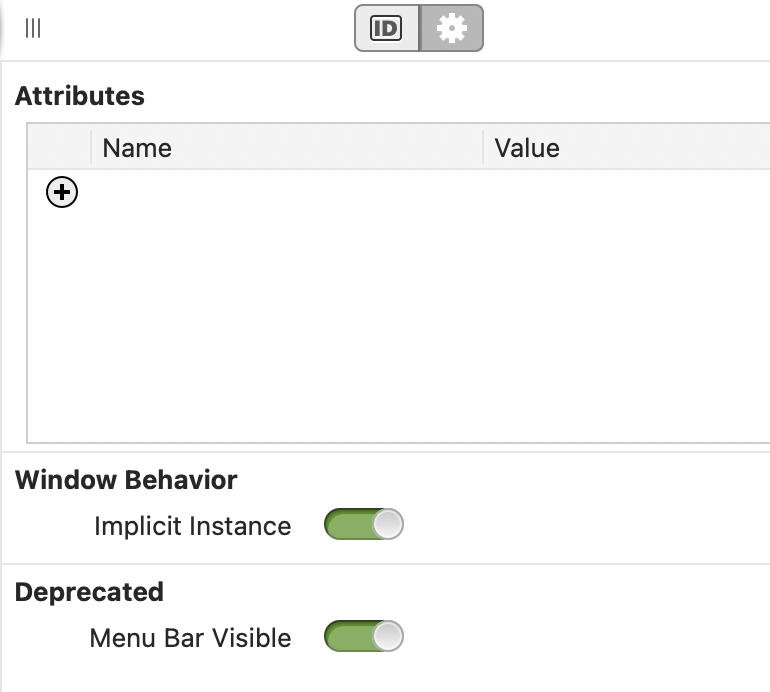
I disabled it and it throws errors… reviewing the errors I was able to find some code I copied for changing background color but didn’t update the form name and viola… problem is resolved. Thanks!
Since you’re new to this, I would advise you to get into the habit of coding without implicit instance turned on. Work through your existing errors, and ask us for help with the rest.
Implicit instance is probably the fastest path to unmaintainable spaghetti code.
Not necessarily new, just a casual coder that creates to scratch personal itches. I do this in my spare time to keep my mind sharp and to create things I can use that do not exist elsewhere or in the format I want. Thank you though. I did learn something valuable today.
Implicit instance strikes again. I swear, I’d love to know the statistics as to how much this feature helps vs how much confusion and frustration it causes. At best it leads to poor coding practices – at worst you have people spending hours puzzling at what is going on.
When used right, it helps immensely. Sure, it can bite you in the b*tt, but so can a lot of other things. I’ve got a million lines of code that would have been a lot more complex without it. Implicit instance is very useful for beginners. It’s the intermediates that start to get in trouble.
Things like this frustrate me to no end because the person who decided the switch should be hidden doesn’t spend any time here helping the people they’ve caused problems for.