Once your chart object has all the contents set, it can render the chart using whatever canvas object with the proper “drawing” primitives in place. Bitmap or PDF. It could even render a SVG string (to show it in a web page). svg_string = chart.ToSVG(params…), chart.DrawToVNSPDF(params…), chart.DrawPicture(params…)
problem is you need to display a web page with a chart on it ! you can’t build a chart completely in code without a web page displaying this webchart. the webchart constructor is protected…
Not sure if I’m following you.
For web, you could use an ImageViewer base and set it’s SVG graphic data built from your future VNSWebChart()
web_graphic_SVG.zip (64.4 KB)
yes if I build a vnswebchart it may be ok.
what I want to say is I can’t use xojo webchart to get it’s picture and embed it in a pdf because I can’t instanciate a xojo web chart in code it needs to be present on the webpage
if I want to build a pdf with a chart build from numbers on the web page, I have to display the webchart too or I can’t get the picture of this (xojo) webchart into the pdf I’m creating.
Well, that’s why I said:
Because the limitations of the closed source “Xojo Chart”
with your help @Sunil_Abraham , thanks, the arabic now outputs like this
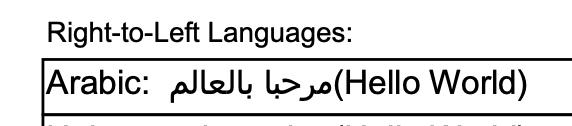
ps: I’ve not yet uploaded the changes to github.
3 Likes
Have you implemented a version of the simpler GoArabic?
Or a “even more subset” of Arabic rules approach?
Harfbuzz is complex, yet the most used lib by pro software apps. I don’t expect it in a 1.0
nope, seems it was “only” the cmap parsing that did not deal with format12 correctly.
Interesting, I would expect that a missing cmap table (quite not standard range for Arabic, only some religious related glyphs AFAIK) generating some error, not a “char by char” render.
Seems like 2 years ago, some RTL processing from GoArabic were considered into FPDF, maybe some basic processing is already included.
THe final version has now been uploaded to GitHub. I removed the PDF deendency graph as it was too complex and replaced with a dynamic HTML version as the interactive dependency graph. This works OK, but could be improved. The ‘export scan results’ PDF has been modified to be a multipage PDF, as it was too long to fit into a single page. This has been an exhaustive process writing this, and I used Claude to help but Claude needed many corrections, which required me to understand more about how PDF files worked. I have entered these competitions in order to learn new programming techniques, and that itself is the main reward. The application I have developed has many ‘dead code’ and redundant code areas that need to be cleaned up. I leave that for the users who download the source code, although I will spend some time when I can to tidy it up. On the whiole, I am reasonably happy that I have made something that will help me develop better applicaitons, and I hope that others will find it useful. The latest version looks like this:
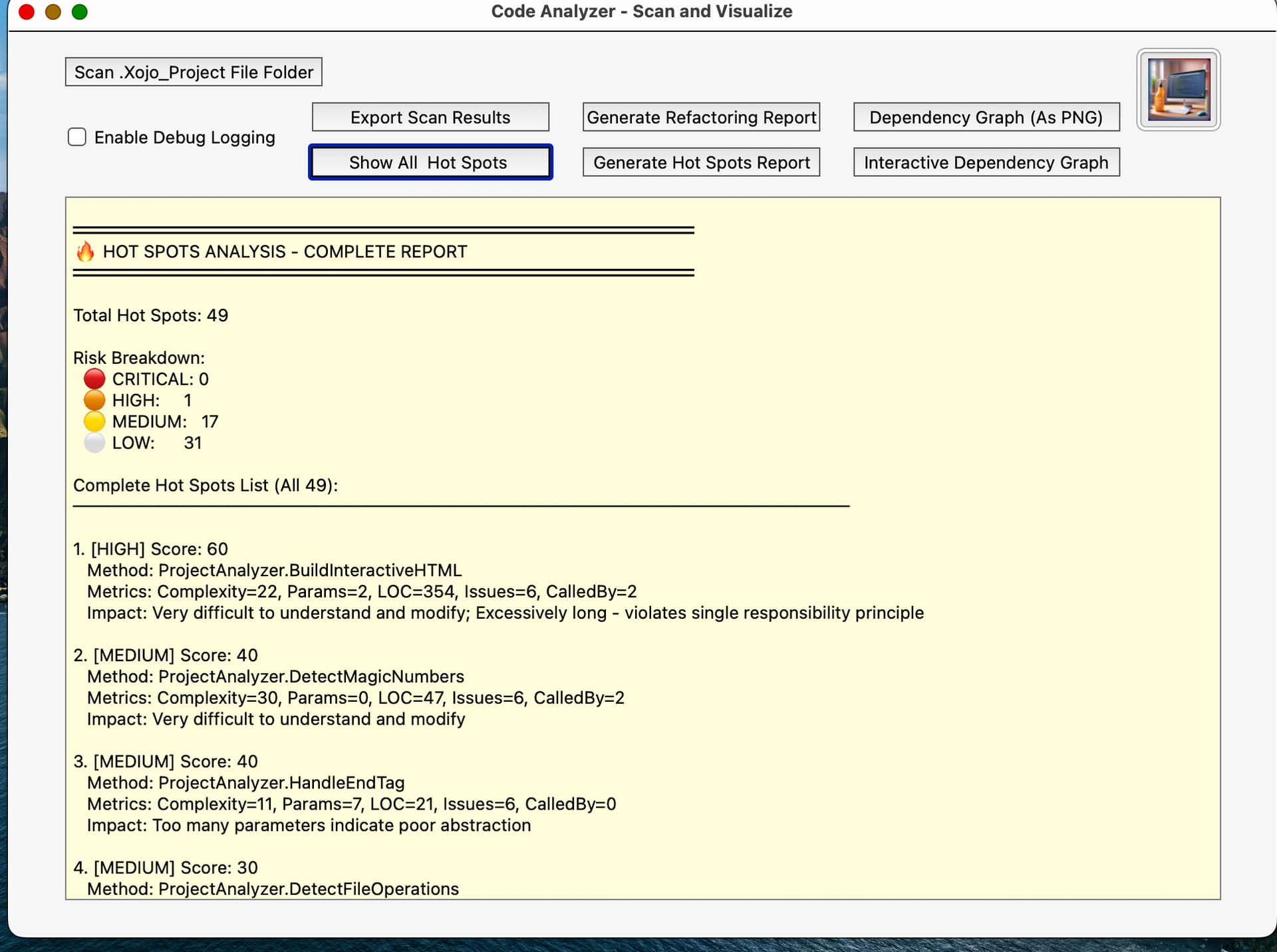
It is available for download from https://github.com/supcumps/CodeCleaner
1 Like
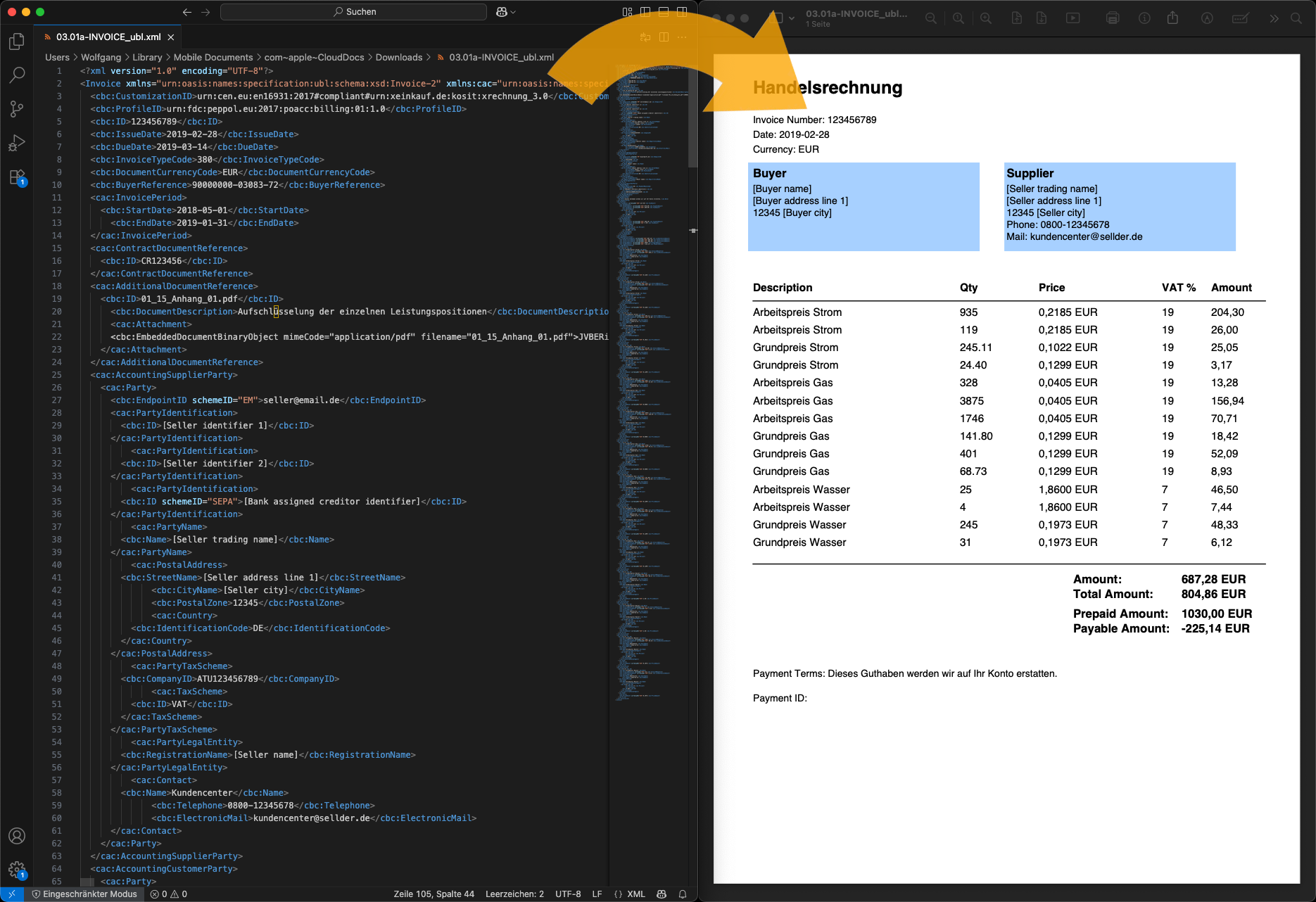
My contribution for November is a class for converting e-invoices in XML format into readable PDF files.
In the EU, companies that send invoices to public administrations must do so in electronic form. These are pure XML files (called XRechnung in Germany). To make them easy to read, I have created a class that reads the XML and outputs a PDF file.
The first release only supports the UBL Schema (Universal Business Language) of XRechnung. CII (Cross Industry Invoice) will be added later. Other formats such as ZUGFeRD or Factur-X should also be implementable.
Github: GitHub - woschwarz/Xojo-XRechnung-Class: Visualizer for XRechnung
4 Likes
I have released an update that can now also process the Cross Industry Invoice schema. In doing so, I realized that it was not a good idea to hardcode the prefix into the extract methods. This is too restrictive, and I will change it in the next version.
 Xojo FPDF Update - PDF Import & Arabic Text Shaping
What’s New in v1.0.0
Two major features just landed in Xojo FPDF:
 PDF Import - Import Existing PDFs as Templates
NEW: Example 20 demonstrates full PDF Import functionality
You can now import pages from existing PDF files and use them as XObject templates in your generated PDFs:
// Create new document
Dim pdf As New VNSPDFDocument(VNSPDFModule.ePageOrientation.Portrait, _
                              VNSPDFModule.ePageUnit.Millimeters, _
                              VNSPDFModule.ePageFormat.A4)

// Import pages from existing PDF
Dim sourcePDF As FolderItem = New FolderItem("/path/to/source.pdf", FolderItem.PathModes.Native)
Dim templateID1 As Integer = pdf.ImportPage(sourcePDF, 1)  // Import page 1
Dim templateID2 As Integer = pdf.ImportPage(sourcePDF, 2)  // Import page 2

// Use imported pages as templates
pdf.AddPage()
pdf.UseTemplate(templateID1, 0, 0, 210, 297)  // Place at full A4 size

pdf.AddPage()
pdf.UseTemplate(templateID2, 10, 10, 100, 0)  // Place at 100mm width, auto height
What Works:
 Multi-page PDF parsing - Full page tree traversal
- Content extraction - Stream decompression (FlateDecode, LZWDecode)
- Resource copying - Fonts, images, XObjects automatically copied
- Nested XObjects - Pages referencing other XObjects work correctly
- Template placement - Scale and position imported pages anywhere
Platform Support:
 Desktop: Full support
 Web: Full support with WebDialog file upload
 iOS: Works with proper font files
 Console: Full support
IMPORTANT: Premium Zlib Module Recommended
Most modern PDFs require the Premium Zlib module for import.
- Why? Modern PDFs use FlateDecode with PNG Predictors (Predictor 15) for efficient compression
- Free version: Only supports basic FlateDecode (simple deflate without predictors)
- Premium module: Includes PNG Predictor reversal algorithms (Predictors 2, 10-15)
- Without premium: Can parse PDF structure but cannot decompress predictor-encoded streams
- With premium: Full support for all modern PDF compression formats
Example:
/Filter /FlateDecode /DecodeParms << /Predictor 15 /Colors 3 /Columns 1859 >>
 Arabic Text Shaping - Proper Contextual Forms Implementation
NEW: Arabic text now displays with proper joined/cursive letters
Arabic script requires contextual analysis to select the correct glyph form (isolated, initial, medial, final) based on surrounding letters. We’ve implemented full Arabic text shaping:
pdf.AddUTF8Font("Arial", "", "/System/Library/Fonts/Supplemental/Arial Unicode.ttf")
pdf.SetFont("Arial", "", 14)
pdf.Cell(0, 10, "مرحبا بالعالم!")  // Displays correctly with joined letters
What Was Implemented:
- Contextual Form Selection - Automatic detection of isolated, initial, medial, and final letter positions
- Unicode Presentation Forms - Maps base Arabic letters (U+0600-U+06FF) to presentation forms (U+FE70-U+FEFF)
- Proper UTF-8 Handling - Correct multi-byte character processing for shaped text
- RTL Block Reversal - Correct right-to-left word order
Result:
Arabic letters now display in proper joined/cursive style with automatic contextual forms, just like native Arabic typography.
All RTL Scripts Work:
- Arabic - مرحبا بالعالم
- Hebrew - שלום עולם
- Urdu, Persian, Pashto - Any Arabic-script language
Updated Examples
Example 5: UTF-8 & TrueType Fonts
- Now includes comprehensive Arabic text testing
- Demonstrates automatic contextual form selection
- Shows proper right-to-left rendering
Example 20: PDF Import (NEW)
- Import multi-page PDFs
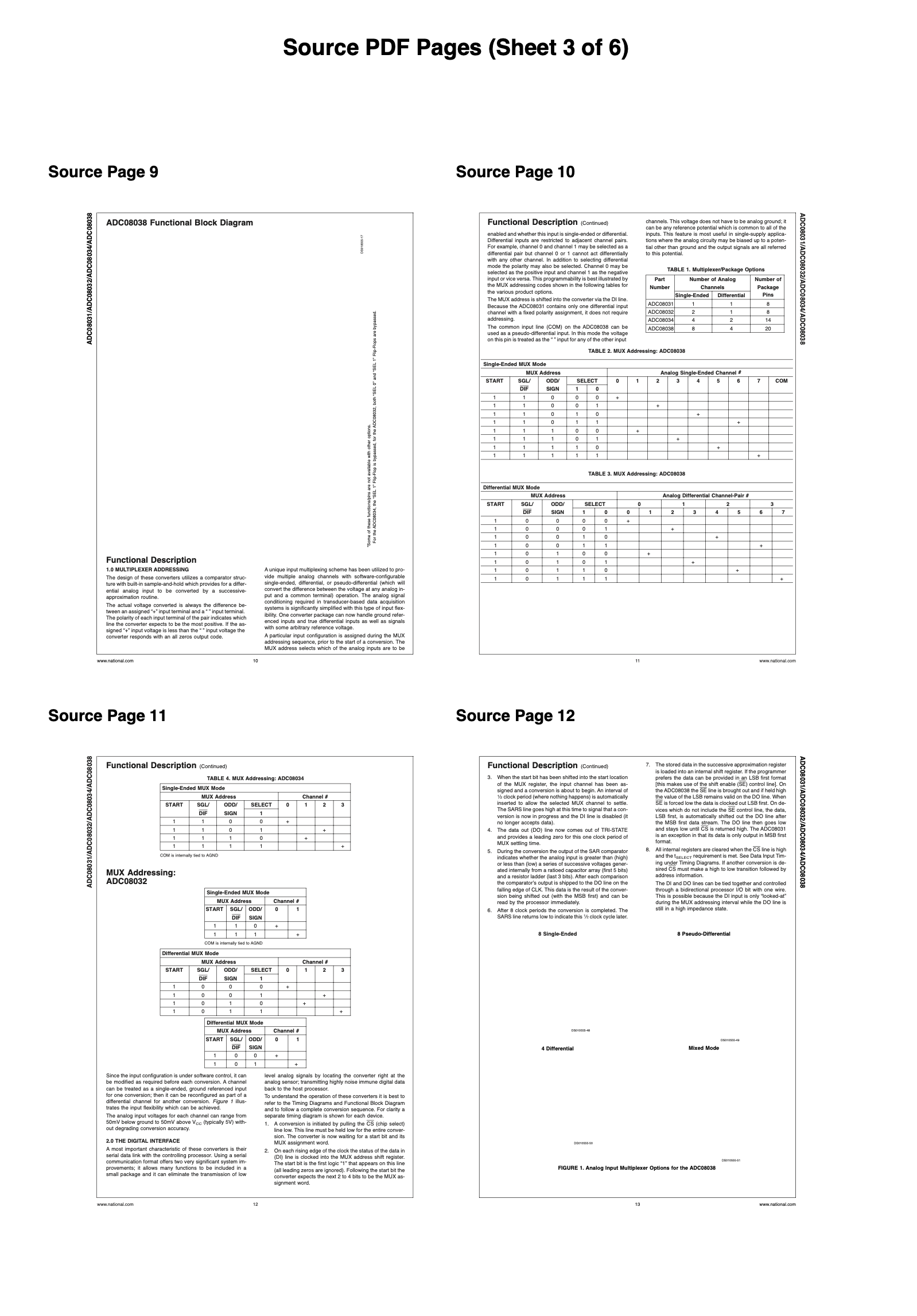
- Display thumbnails in 2x2 grid
- Demonstrates resource dependency copying
- Shows template scaling and positioning
Platform-Specific UI
Desktop
- Example 14 (Encryption): Uses SecurityDialog for password/permissions input
- Example 20 (PDF Import): Uses OpenDialog for file selection
Web
- Example 14: Uses WebDialogSecurity for encryption settings
- Example 20: Uses WebDialogPDFUpload with file upload flow
- Select PDF → Enable OK → Upload → Process
Architecture Highlights
PDF Import Implementation
Complete PDF parsing system in pure Xojo:
- VNSPDFReader - Multi-page PDF parser with page tree traversal
- VNSPDFParser - Object parsing and type system
- VNSPDFTokenizer - Lexical analysis of PDF syntax
- VNSPDFStreamReader - Binary stream handling
- VNSPDFStreamDecoder - FlateDecode/LZW decompression
- VNSPDFLZWDecoder - Pure Xojo LZW implementation (no declares)
Arabic Text Shaping
- Automatic contextual form selection (isolated, initial, medial, final)
- Unicode Normalization Form C (NFC) for canonical representation
- Proper UTF-8 code point tracking in ToUnicode CMap
- RTL block reversal for correct word order
Quick Example - PDF Import with Arabic Text
// Create document
Dim pdf As New VNSPDFDocument(VNSPDFModule.ePageOrientation.Portrait, _
                              VNSPDFModule.ePageUnit.Millimeters, _
                              VNSPDFModule.ePageFormat.A4)

// Import existing PDF as template
Dim sourcePDF As FolderItem = New FolderItem("/path/to/invoice.pdf", FolderItem.PathModes.Native)
Dim templateID As Integer = pdf.ImportPage(sourcePDF, 1)

// Add page with imported background
pdf.AddPage()
pdf.UseTemplate(templateID, 0, 0, 210, 297)  // Full page background

// Add Arabic text overlay
pdf.AddUTF8Font("Arial", "", "/System/Library/Fonts/Supplemental/Arial Unicode.ttf")
pdf.SetFont("Arial", "", 14)
pdf.SetTextColor(0, 0, 255)
pdf.Text(20, 20, "مرحبا بالعالم!")  // Arabic text overlaid on imported PDF

// Save
If pdf.Ok() Then
  Dim f As FolderItem = SpecialFolder.Desktop.Child("output.pdf")
  Call pdf.SaveToFile(f)
End If
Current Status
Xojo FPDF v1.0.0 is out with:
- 20 working examples - All features demonstrated
- Cross-platform - Desktop, Web, iOS, Console
- 100% Open Source - MIT license, full source code
- Full Unicode - TrueType fonts with automatic font subsetting
- PDF Import - Import existing PDFs as templates
- Arabic/RTL Support - Automatic contextual forms and right-to-left rendering
Premium Modules Ready:
 Encryption Premium - AES-128/256 (RC4-40 in free version)
 Table Premium - Professional tables with pagination
 Compression Premium - Pure Xojo zlib (iOS support + PNG Predictor reversal for PDF Import)
Try it today! All source code and examples available at [VNS Link]
5 Likes
Wow what a big finish for Year of Code! I loved seeing all these PDF projects and the discussions they brought on. November’s winner is @Beatrix_Willius!
That wraps up Xojo’s 2025 Year of Code! I’d like to thank everyone who participated through the last 11 months! We had nearly 50 projects submitted and uploaded to GitHub (mostly). I hope these projects help spread knowledge of Xojo and offer code to help users get started or expand their projects.
I’ll make a final post in the next few days to announce the grand prize winner.
2 Likes