There’s a larger opportunity here. DesktopCharts has a DrawInto(g as Graphics) method. If Graphics was replaced with a class interface – say, DrawingContext – then we could implement our own classes that could accept drawing commands from a wide variety of sources and render them in any number of ways. This would allow the author of these PDF classes to write a bit of code that would do exactly what you’re describing; and that same bit of code would be usable with any object that draws to a Graphics object.
This could be done seamlessly with existing code because the current Graphics class could implement the DrawingContext interface.
Can I use the library with existing PDFs to add headers/footers and links?
I create PDFs in a 2 step process. Html is loaded into a htmlviewer and then “printed” into a PDF. The second step adds header/footer with the existing PDF into a new PDF. This has the problem that links are cut off because macOS doesn’t support this. However, I always thought a DynaPDF license way too expensive for just one little feature.
1 Like
The Arabic displayed on the image is not correct. Its printing as character by character which is not correct in the case of arabic.
1 Like
A number of years ago, I looked into what it would take to create my own rendering engine for Arabic and other scripts that require similar contextual features. Let’s just say there’s a reason Adobe keeps a team of people on staff to maintain their text rendering system. It is incredibly complex at the lower levels to get this right. This is exactly the kind of feature one would reasonably expect to pay extra for.
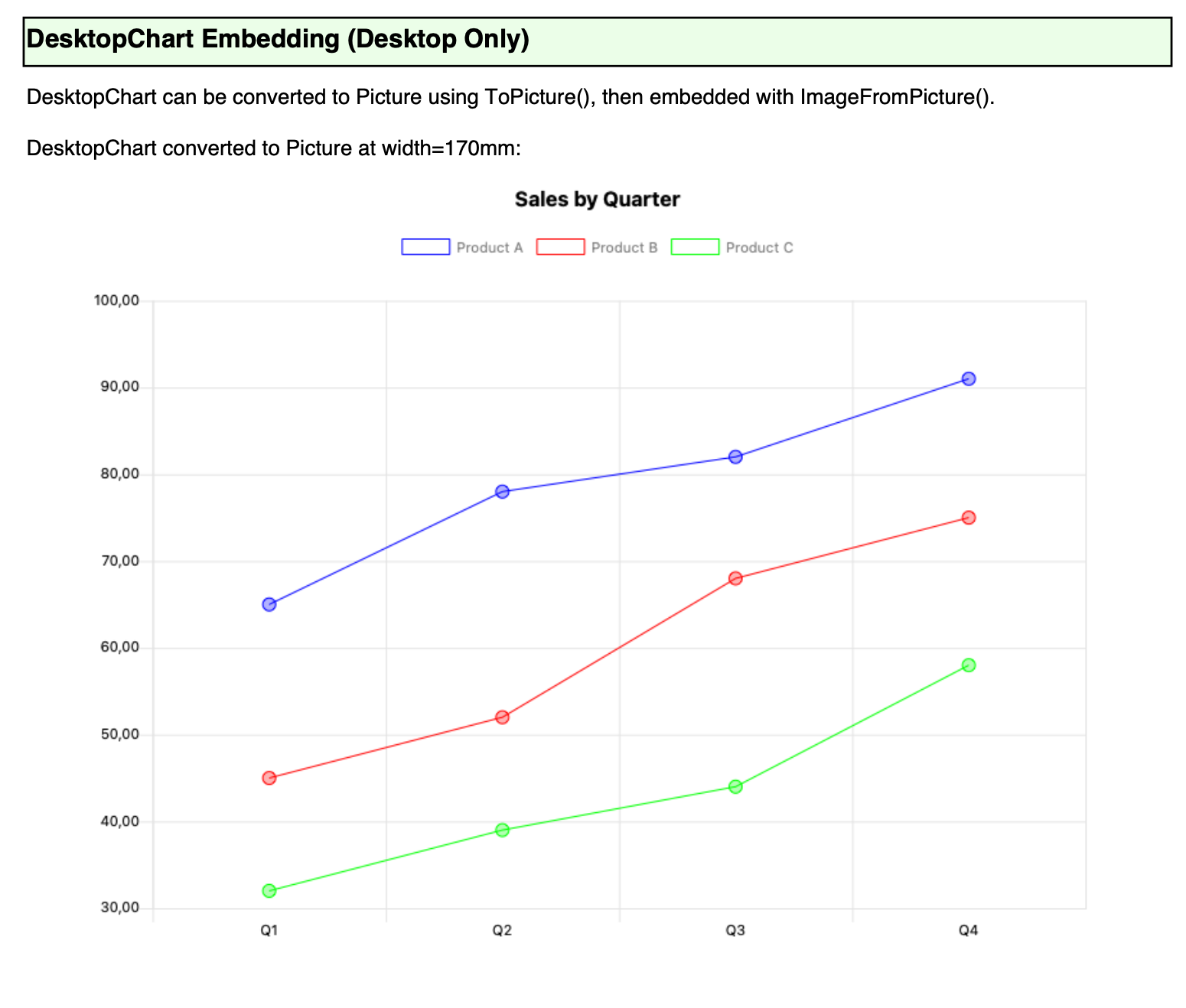
Example 9 output pictures, generated graphics and desktopcharts.
I was not able to make it work for webchart because it seems webchart constructor is protected (bug ?)
so I can’t instanciate a webchart by code, only in a webpage
2 Likes
not actually because it would need pdf import into the fpdf library
but it is a feature I want/need so it may be there in a near future !
2 Likes
But does that work with UTF8 strings, including non-latin characters? When you say Picture are you talking pixel style or fully scalable vector graphics?
FPDF is designed for that. And uses subsets of glyphs, that means vector graphics.
When using ImageFromPicture() yes, you can insert bitmaps as JPG or PNG into the PDF.
Download it and play with it. I guess Jean-Yves has tested it and has examples there.
Yes, but the question was. Does the DesktopChart output fix the problem with the built in PDFDocument and correctly process UTF8 full character set.
Also, do the graphics output by DesktopChart come as Vector graphics, as they do with PDFDocument. Talk of pictures is ambiguous as they are frequently pixel based.
Obviously, but that doesn’t answer either question.
The answer is no, it won’t fix PDFDocument things. It makes (should…) perfect PDFs using another engine Unicode capable called FPDF.
Try it. You will see by yourself.
I haven’t yet, but I know FPDF (Go).
We’re clearly talking different languages. I don’t expect it to fix PDFDocument, how could it. I simply wished to know if it allowed DesktopCharts to output as vectors (like PDFDocument does) and allow the full character set of UTF8 (unlike PDFDocument).
When I said Unicode, it meant yes for that.
I can’t see mentions about it in his website, so I guess he expects you to render a picture of the chart as bitmap there (becomes an embedded PNG or JPG).
Which would be unfortunate, PDFDocument produces vector as I need, but no UTF8 support. This provides the UTF8 support but apparently, unless we’re wrong, no vector support.
There is vector support. But inserting the primitives directly in the PDF. Lines, curves, text, etc.
What you want would need support from DesktopChart passing a FPDF for Xojo as canvas, and DesktopChart using the PDF graphics directives to render the chart as vectors into the PDF.
DesktopChart already does this for PDFDocument.
the fpdf library does vector graphics as Rick said. so does xojo fpdf.
just need to set up an example that has desktopchart AND utf8 chars
For a moment I thought you should need to create a VNSChart() to solve that.
1 Like
it’s more or less in the plan as webchart can’t be created by code so I can’t build a chart in a pdf in a web app !