I recently purchased a licence to update from 2024R2 to 2025R2.1.
I develop on Mac Sequoia and the compiled app for Mac remains as before but the Windows app has become unreliable.
Things like having to click buttons twice to get them to work, intermittent crashing on startup. App not opening at all, then it does next time I launch it. The program lags and takes along time to do anything.
Could not pinpoint the problem as it isn’t in the code or it would be consistent at some point but it’s completely random.
Then I installed xojo on a Windows computer and compiled and the Windows app runs perfect every time. Definitely something wrong with how Mac compiles for Windows in new Xojo. Anyone else experiencing this?
Is your build folder inside some cloud shared folder?
Do you have details for the crash report?
Did you compare the builds that work to the ones that don’t?
Maybe you didn’t copy the whole app folder and miss some libraries?
Yes build folder is on OneDrive so I can access it from both systems.
The Mac app is distributed as a pkg file using App Wrapper the windows package is made with Inno.
Don’t build within OneDrive.
it may not sync all files quick enough.
get confused with many files being deleted and created.
so it is likely that you miss a library when you run the app.
2 Likes
A typical customer complaint -
I have been a devoted ***** user for many years, but the last year or so, it has been a real beast. I usually run it maximized on Windows 10, but the tab bar with Add Cat, Edit, Delete, etc. now occupies the front focus and covers the information. Printing out pedigrees has become a nightmare that takes 10 minutes or so, waiting on the program to figure it out. Since most people who get my cats want the pedigrees ahead of time, it gets really exasperating. I did move a bunch of backups out of the file location to another drive on my system and that helped considerably (the program now opens and doesn’t crash), but the tabs get so cumbersome. … Often, when I go to print a pedigree, I get an error box that states “Graphics object cannot be used outside its Paint event” and I also get a totally blank pedigree, except for the grid - not data at all in the grid. I recommend ***** to everyone who gets a cat from me to help with their records organization, but I am getting very concerned with all the crashes and glitches lately. It has always been rock solid in the past. Sorry to ■■■■■ so much, but this is my right hand in the management of my cattery.
@Craig_Grech - fwiw, what I do is build to my local machine (MacOS) and then use a build script to compress the built app into a .zip archive, and then copy said archive to a shared folder.
This makes the build quick and reliable and I get the app where I need it and compressed (which I do because it makes it more portable in my use case)
Writing the script was a little bit of a pain, but once it was done, it took away multiple steps I sometimes did many many times per day.
Maybe the same could work for you?
Anthony
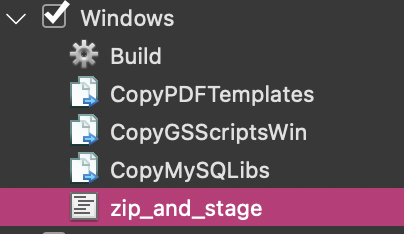
(zip and stage is an IDE script)
Sorry for your troubles.
Sounds like a mixture of performance issues and some bugs in the app.
“Graphics object cannot be used outside its Paint event” is a thing. Do you store somewhere graphics objects to draw inside later?
You should have all information in properties and have a paint event draw them.
You may need to contact Xojo, provide your app, the Windows build on the mac and the build on Windows.
You can create a private ticket on Issues.
Other than that (in the mean time), compile on Windows as you said it works perfect.
1 Like
The only place I use a graphics object is to pass it to your DynaPDF but as I’ve messaged you recently it has been throwing up some weird messages with Xojo 2025R2.1 as well.
Alll I need other than do is restart the app and perform the same thing again and it works. Never get this message on Mac, only windows.
Well, if the issue is solely because OneDrive is being used, the report will be closed soon as “by design”. Better to first rule that out.
2 Likes
Yes will do that but first I’ll try compiling to a different folder (not oneDrive).
Not the end of the world - I should be testing the app in the OS before distribution so building it on the same OS beforehand is no big deal.
I now only sync the project files to the cloud and not the Builds folder so it shouldn’t be too complex for oneDrive.
1 Like
Correct. I don’t know Craig’s workflow, I hope is easy to test and confirm.
1 Like