Because driving a car to another city at 80km/h for 2 hours listening music with air conditioning is better than walking 2 days under sun and rain.
It was, as they introduced the proper changes, now we have internationalization.
Because driving a car to another city at 80km/h for 2 hours listening music with air conditioning is better than walking 2 days under sun and rain.
It was, as they introduced the proper changes, now we have internationalization.
For a person, perhaps.
For the nature, certainly not.
All is relative.
They should have considered other locations since the beginning.
As a person, I’m ok being happier than an Amish.
That’s not how technology evolution works. In the beginning, before the creation of the ASCII coding, we even hadn’t lowercase letters, just uppercase ones. Having Unicode in the 60’s for example would be science-fiction, as cell phones.
No screens either. First computer I worked on (as a student) was an Elliott 803B with 4k words of store and a papertape reader/punch as its only peripheral. A bit hard even to represent lower-case on 5-hole papertape.
I rebuild plugins with Xcode 14.1, but not sure if that now helps:
Indeed, it crashes too.
Running r4 here. No change–as typical, launched successfully on the third try.
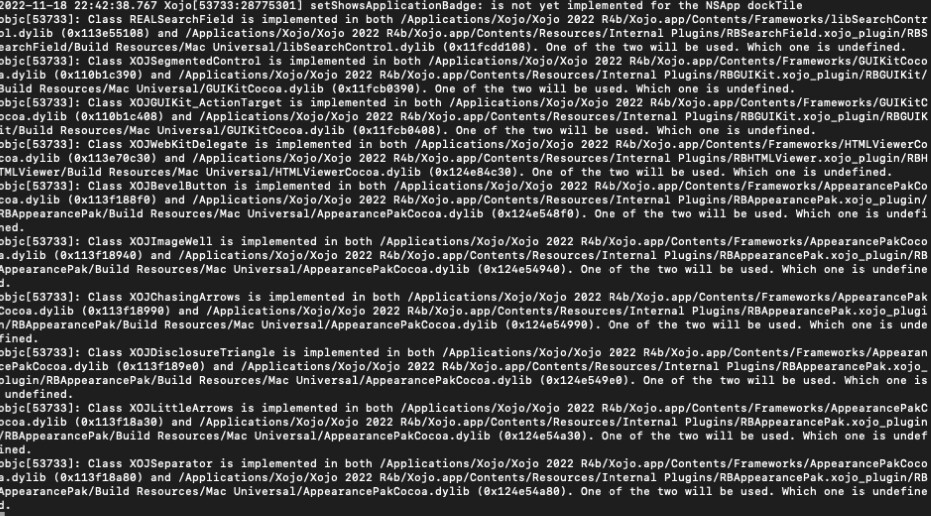
Maybe its time Xojo should fix all the dylib load errors in the IDE that have been there for long time delaying the load of the IDE…who knows maybe the error they cause clobbers memory in Ventura: (Is just an idea !!)
The accumulation of garbage (and workarounds) one day will cause a massive fail. Is that day already?
The “one of the two will be used, which one is undefined” part adds some “random” features to some bugs.
One thing I really do not understand. Xojo Inc is pointing to Apple for this problem.
But Xojo is the only app having this issue. And now it seems it throws dylib load errors for a long time. Puzzled … 
I guess it is time to point to Xojo Inc and go back to the drawing board regarding loading/using dylibs.
BTW I payed for a license and sadly I cannot use it on my system running macOS 13. That’s not funny. 
You said Xcode didn’t. That doesn’t mean all others are OK.
Well, the duplicate classes doesn’t cause a problem.
It’s the same classes used both in the plugin within the IDE and in the loaded internal plugins.
The real solution here would be to move the parsing of the plugin files into helpers, so you could run multiple of them and have them output whatever the IDE needs into SQLite databases, so the IDE could then query those for auto completion.
And I think new plugins crash less here. If you see crashes, you can mitigate it:
Can you name another app that crashes?
I still think this is the only way out.
I only use 16 MBS plugin files.
I just checked how many dylibs Bitwig Studio loads on launch. It’s a whopping 108
And … it doesn’t crash here. Works as expected.
Edit: Ableton Live loads 142 dylibs. No crashing. Nuff said.
Edit2: I installed an old version of FL Studio. That one loads 42 dylibs. No crashing.
Basically I think it is very fair to say apps that uses plugins/dylibs work fine, except Xojo.
No, I’ve not tested.
Ok, now we know it’s specific to Xojo. Well done.
It adds uncertainty. Multiple possible points of failure. If I have an aaa.dylib in one place and another aaa.dylib in another, who can assure both have the exact same binary and do the same things? And if both are the same, why do I have 2 copies of it?
The IDE and plugins should load (if not already in the memory) the necessary shared dylibs from the same shared place.
This can’t be tolerable. No plugin should crash. If my IDE can’t handle this safely, will my apps made with it will be able to?
Rick is correct, problem should not be obscured to try to fix it, obscuring problem is probably the worst thing that can be done, it should be understood and then fixed.
Dividing dylibs between processes just because of not understanding the problem would be like sweeping it under the carpet and putting the head in the sand.
And as I noted above then handling all warnings is good start. Even if they “Should not cause issues” then there is nothing saying they don’t, even just the error reporting from it could in theory clobber memory if there is bug in it.