agreed! Im just not sure it was the date picker so I have to get with jim before I lodge a ticket. Thanks for the help my friend.
1 Like
Hi: my solution to many IDE problems.
Save the project to .xojo_code
Edit the …xojocode with a text editor
Doing this I got all the tab orders correct, also all the parent-child control relationships, also all the tricky alignments and z-orders for deliberately overlapping controls. This was for a window with about 100 controls.
It was easy to do, easy to test, easy to adjust.
2 Likes
That is brilliant and sad all at the same time! I never would have though of that but I love it! Thanks Mike!
Yes, I agree, a great solution and something I don’t usually think about as I don’t normally hack on my Xojo source files in a text editor.
What do you need to change?
For example this sample: Container Sample
The first thing to do is take the linked example, open in Xojo and then save as a “Xojo Project” which will then be text.
Next, although I believe @Mike_Linacre1 said the .xojo_code file, in this particular case I think you’ll want the Container1.xojo_window and the Window1.xojo_window files. Open these in your favorite text editor.
Then find the control you’re looking for and the TabIndex property…
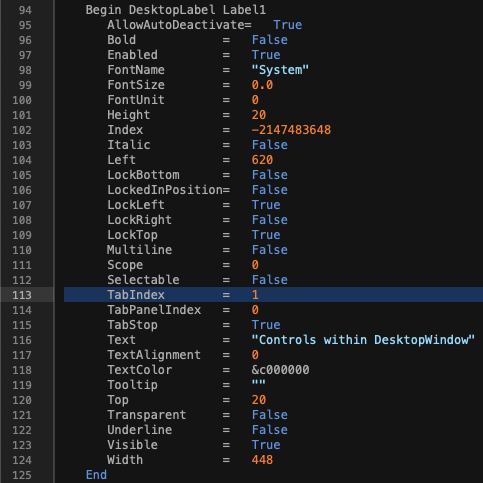
You can then manually change the value and number things appropriately.
In looking at the example you brought up though, I’m not seeing any TabIndex values that don’t align to the IDE nor do I see anything that would cause the actual UI issue when tabbing through the interface in the (compiled) project.
@Mike_Linacre1 Would you mind taking a look at the linked project and see if you can find what’s borked? Or maybe I misconstrued what needs to be done to the file(s) in a text editor? Maybe it’s not the TabIndex property but instead something else?
On a semi-related note, in case it helps others, my best guess is that this issue is mostly (solely?) seen in layered controls. I very often use container controls for management, groups boxes and sometimes even rectangles in order to visually “cluster” controls together for visual differentiation. Of course behind the scenes within Xojo’s own code, I’m sure this can get complicated quickly and there’s likely some edge cases and bugs that are there as a result. I’m mentioning this because I’d guess, but I might be wrong, that these kinds of tabbing issues go away if you have a “flat” interface design (e.g. all controls directly on a window with no layering and no container controls).
1 Like
Yes, thank you. I did that but I didn’t see any (obvious) errors from the linked file for TabIndex, so I was not able to ‘make it work’. Maybe that example can’t be fixed (maybe?) or there are other things to check on the text file that I don’t know.
@Patrick_Salo this is quite nice of you to do. I imagine this will help others who have this problem. Mine was entirely flat, all controls on a window wit no other tab/page panels or other complications
This is great to know and thanks for the clarification. Guess my hunch was off or I was overly hopeful that this problem wasn’t as bad as it is. 
I have always had bad luck with the tab order system. It’s particularly a pain if you add a control to an existing window and want it to be inserted in the middle of other controls, focus-wise. I have instead, with some help from the forum a while back, use the “ClearFocus” and “ReadOnly” commands together with the SetFocus command to get the controls active when I want them. It’s probably a lot of extra code but in the end I know what’s going to happen and in what order.
2 Likes