SQLite: Another row available

Sort is not a reserved word: SQLite Keywords

I’ll have more data soon, just need to get back to my computer. I don’t think the sort column is the issue, it’s just an integer column. I found another exception in my database that is the same exception but for a completely different statement.

What I’ll have once I’m back to my computer is the full schema and data for that maps table, as well as the complete database if anybody wants to try to reproduce it. Hell the whole project is open source if somebody wanted to go that far.

Double quotes. Single quotes is almost all the time reserved to string literals.

1 Like

Status 100 shows up after a sqlite3_step() as a kind of “OK, not EOF”.

https://www.sqlite.org/c3ref/step.html

Also read about Compiling An SQL Statement and Reset A Prepared Statement Object

And have in mind that the sqlite3_prepare() interface is legacy and should be avoided.

0, 100 and 101 are Ok steps. I think that in some point under some condition, Xojo DB engine have some bug that mistakenly leaks some step status as an error to an upper layer.

Based on what I’ve been told from other sources, this is almost certainly what is happening. The exact message “another row available” has been confirmed to belong to the 100 status, so there’s nothing to be gained from waiting for my error reporting to tell me the same thing.

In which case, I don’t see how this couldn’t be a Xojo bug. Still… why am I only getting this in my two most recent builds, despite them all have been built with 2020r2.1 since February. The database schema hasn’t changed in that timeframe either.

I suspect this is Xojo’s bug being brought to light by something in my data under extremely specific circumstances. Both traces I have for this exception are on Windows, so maybe that is a factor.

I’m still going to get the data posted, I just don’t think we’re figuring this out. I suspect Xojo would have to do some code spelunking, but without a useful reproduction case, there’s no way to confirm the fix even if something is found.

Ok, here’s the maps table and data. You’ll need to remove the foreign key or make sure enforcement is off, but I left it in the output because I’m trying to give you the most real-world data possible.

CREATE TABLE maps (
	object_id TEXT COLLATE NOCASE NOT NULL PRIMARY KEY,
	mod_id TEXT COLLATE NOCASE NOT NULL REFERENCES mods(mod_id) ON DELETE RESTRICT DEFERRABLE INITIALLY DEFERRED,
	label TEXT COLLATE NOCASE NOT NULL,
	ark_identifier TEXT COLLATE NOCASE NOT NULL UNIQUE,
	difficulty_scale REAL NOT NULL,
	official BOOLEAN NOT NULL,
	mask BIGINT NOT NULL UNIQUE,
	sort INTEGER NOT NULL
);
INSERT INTO maps VALUES('d3e1b2b0-beea-49fb-a8d7-ef12f1f8f4b4','30bbab29-44b2-4f4b-a373-6d4740d9d3b5','The Island','TheIsland',4.0,1,1,0);
INSERT INTO maps VALUES('ac6d291e-97ba-4ba3-94d5-fe6b43447cff','55dd6a68-7041-46aa-9405-9adc5ae1825f','Scorched Earth','ScorchedEarth_P',4.0,1,2,1);
INSERT INTO maps VALUES('1f11e101-41bc-42a3-b3a9-c334eb9a9e83','38b6b5ae-1a60-4f2f-9bc6-9a23620b56d8','Aberration','Aberration_P',4.0,1,16,2);
INSERT INTO maps VALUES('a51b3288-5820-4720-973c-30eac81b3817','687cce7c-f1c4-440d-9bea-bd80f2717e2b','Extinction','Extinction',4.0,1,32,3);
INSERT INTO maps VALUES('ab37fed9-45b3-4840-a248-d22a7e2905b4','abbc2e33-f7c9-4b31-b906-bfdc8adc3685','Genesis: Part 1','Genesis',4.0,1,128,4);
INSERT INTO maps VALUES('31139965-1c12-4495-b7a2-850b66cb09ad','72d012d5-f9ff-4c20-b8be-118d630aaadc','Genesis: Part 2','Gen2',4.0,1,512,5);
INSERT INTO maps VALUES('15cecd81-973f-40e0-8c90-bb3d10103ea7','4dd9a0a5-add5-439c-9e80-103c6197d620','The Center','TheCenter',5.0,0,4,0);
INSERT INTO maps VALUES('5049df94-a95c-496e-a627-24c8d76c98c9','d23706bb-9875-46f4-b2aa-c137516aa65f','Ragnarok','Ragnarok',5.0,0,8,1);
INSERT INTO maps VALUES('a7f6dee0-6a71-46c0-8e02-d77bd5571df2','c9e5d408-078d-4a30-b15c-ae28be7b8c0b','Valguero','Valguero_P',5.0,0,64,2);
INSERT INTO maps VALUES('4485ce14-72db-4fc1-a8df-4de714f57dc9','444cd667-c5c4-4003-a4bf-f0b0153c885e','Crystal Isles','CrystalIsles',5.0,0,256,3);

Here’s the complete database: filehosting.org | Download | Library.sqlite.zip

And the other statement that has reported this exception is

SELECT loot_source_icons.icon_id, loot_source_icons.icon_data, loot_sources.experimental FROM loot_sources INNER JOIN loot_source_icons ON (loot_sources.icon = loot_source_icons.icon_id) WHERE loot_sources.class_string = ?1;

I still don’t think this will be reproduced though.
@William_Yu read this thread and have a look at this post, maybe some engine upgrade introduced changes needing to be done. Seems some hidden bug related to prepared statements. SQLite: Another row available - #23 by Rick_A

@Thom_McGrath
Would you happen to be using DetachDatabase or RemoveDatabase in your code?

I’ve created a case for this.

<https://xojo.com/issue/65466>

4 Likes

I do not.

Thank you for the fix Greg.

Sadly the fix wasn’t included in 2021r2.1

FWIW I am now getting this error in an SQLite database I have hosted under CubeSQL. I have never seen this error 100 before. If I remove the RETURNING… command there is no error, but I just want verification that that this particular record exists and was updated.

I have an easy workaround, but thought this might help future enquirers as @Thom_McGrath had this error with a SELECT command, whereas I had it with an UPDATE command.

UPDATE HelpTopics SET EditorFileID = :EditorFileID, Category = :Category, Description = :Description, EditorFileContents = :EditorFileContents, Name = :Name, SubCategory = :SubCategory, TopicURL = :TopicURL WHERE EditorFileID = 1 RETURNING *

What driver (plugin) are you using to access such database? Xojo’s or CubeSQL’s?

If Cube, you need to contact them, there’s a bug, maybe at the server part.

I am using MBS’s SQLDatabaseMBS for connection using MBS’ builtin CubeSQL driver (via Call InternalCubeSQLLibraryMBS.Use) and not the CubeSQL-provided driver.

Since you’re using RETURNING, you are in effect doing a SELECT, even though it looks like an UPDATE. So the method will need to be SelectSQL rather than ExecuteSQL, or the MBS equivalent.

Tim is correct. Error 100 points to a “there are more data left” condition, and such data are the Return values. So a command expecting data returns (row sets) should be issued.

Actually, I have one Class Method that performs all SQL commands to the database and it’s SQL Brand agnostic (it handles at least CubeSQL, SQLite, MSSQL, MySQL and PostgreSQL).

Normally the SQL commands are handled on my REST server (for security), but since this is a bespoke connection from the user, it connects to the database directly from the app.

So in my case, the error occurs in the rs = tempSQLPreparedStatementMBS.SelectSQLMT command:

Select Case SQLCommandType
Case "SELECT"
  Try
    rs = tempSQLPreparedStatementMBS.SelectSQLMT
    
  Catch Error
    isDBError = True
    DBErrorMessage = Error.Message
    DBErrorCode = Error.ErrorNumber
    Return
  End Try
  
Case "DELETE", "INSERT", "UPDATE"
  Try
    If isReturning Then
      rs = tempSQLPreparedStatementMBS.SelectSQLMT 'error occurs here
    Else
      tempSQLPreparedStatementMBS.ExecuteSQLMT
    End If
    db.CommitTransaction
    
  Catch Error
    isDBError = True
    DBErrorMessage = Error.Message
    DBErrorCode = Error.ErrorNumber
    Return
  End Try
  …
Case "ALTER", "BACKUP NOW", "CREATE", "DROP DATABASE", "RENAME DATABASE", "SET KEY", "START DATABASE", "STOP DATABASE", "VACUUM"
  …
Case "DROP"
  …
Case "SHOW DATABASE INFO"
  …
End Case

Go one step back and observe how you prepared the query you tried to fire, in the detail.
Confirming an issue, try to create a sample mimicking it with only the necessary BASIC steps.
Submit the case to MBS.

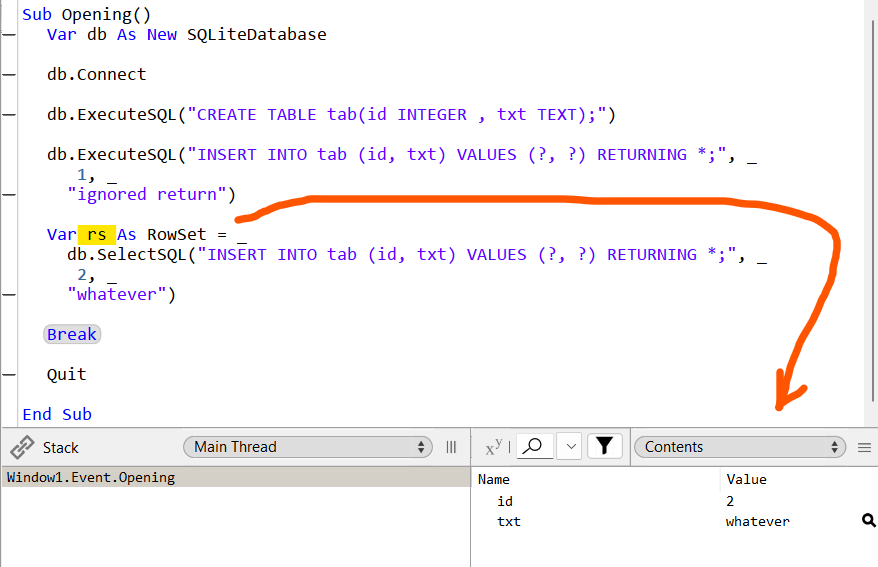
Natively, and currently, it works for every case (exec or select):

Var db As New SQLiteDatabase

db.Connect

db.ExecuteSQL("CREATE TABLE tab(id INTEGER , txt TEXT);")

db.ExecuteSQL("INSERT INTO tab (id, txt) VALUES (?, ?) RETURNING *;", _
 1, _
"ignored return")

Var rs As RowSet = _
db.SelectSQL("INSERT INTO tab (id, txt) VALUES (?, ?) RETURNING *;", _
 2, _
"whatever")

Break

Quit