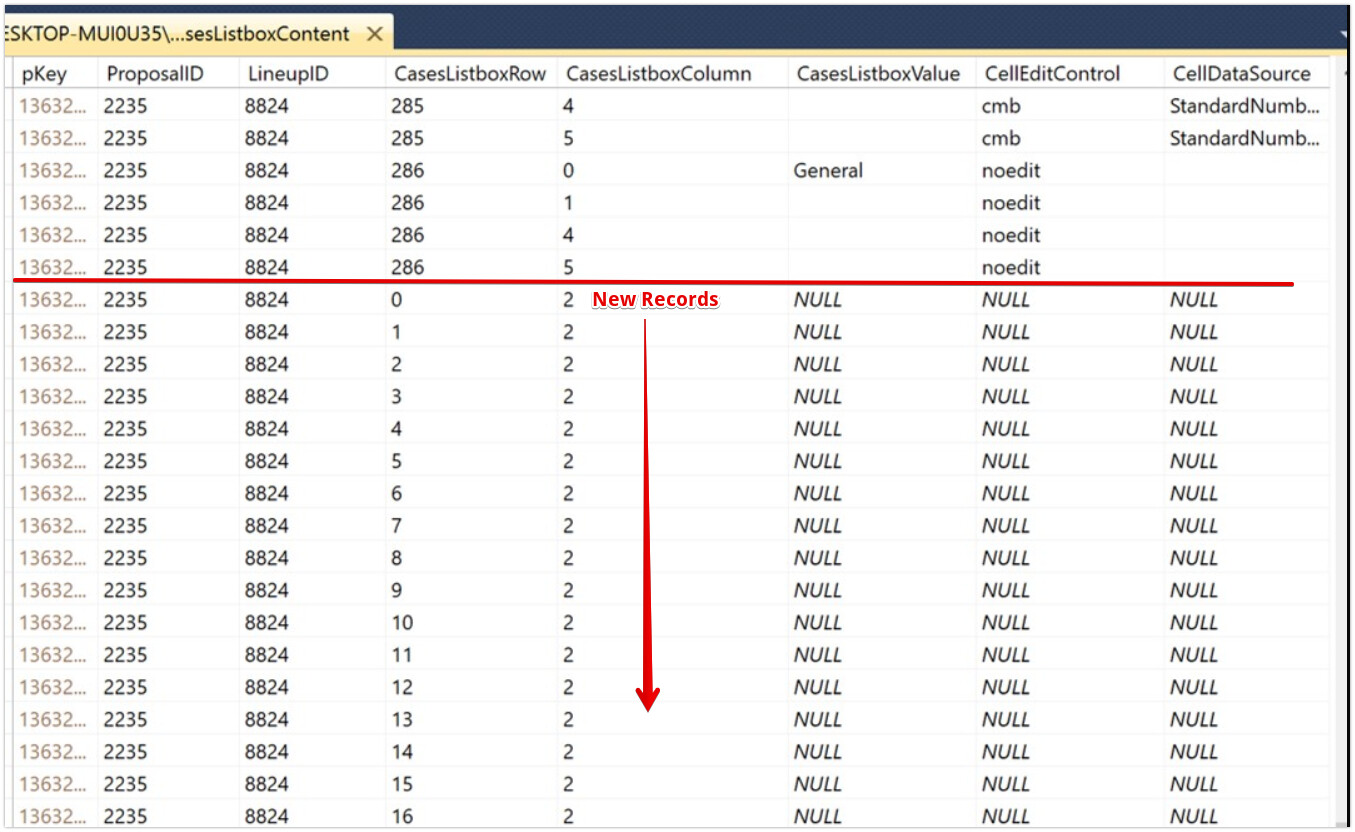
That didn’t work either (see image below) … BUT, I noticed another instance of my being a dumass … I inadvertently mixed things up between rows and columns when describing it to you and Kem. I’m actually trying to copy all data with CasesListboxColumn = 4 to CasesListboxColumn = 2
or, editing what Kem stated to what I actually needed:
Do you mean you want to duplicate the records that currently have CasesListboxColumn = 4 to new records with all the same data except a new id and with CasesListboxColumn = 2 ?
I don’t get it. Must be some simple, stupid mistake I’m making. But the I tried the following (after replacing CasesListboxRow with CasesListboxColumn and still get nothing but NULL values in the destination records.
  sql = "INSERT INTO CasesListboxContent (CasesListboxColumn, ProposalID, LineupID, CasesListBoxRow,CellEditControl, CellDataSource) " + _
  "SELECT 2, ProposalID, LineupID, CasesListBoxRow,CellEditControl, CellDataSource " + _
  "FROM CasesListboxContent " + _
  "WHERE CasesListboxColumn = 4"

   Do you see anything wrong in what I'm doing???
The records that are the destination (CaesListboxColumn = 2) already exist (with primary key values). I create them just prior to attempting the copy routine. Frankly, I’d love a way to both create those records and fill them with the copied data all at once (I’m pretty sure there’s a SQL statement that would do that … but it’s unbeknownst to me! )
The statement you’re trying will create new records (as discussed), they won’t update existing records. Is it possible you’re not looking at the new records?
As we only see CaseListboxRow 285 and 286 with CaseListboxColumn 4, we need to see if the new records with CaseListboxRow 285/285 with CaseListboxColumn 2 copied the other columns too. Can you scroll down to check?
Edit:
I re-read your comment. I’m sorry is confusing what you are saying, so is not clear for me what you already did, what you want in the end and what errors are you seeing with the queries proposed.
I assumed that the Query worked as the screenshots you posted are different.
Kem raised the question above. The answer is I thought this was UPDATING the records I had already created for CasesListboxColumn = 2. DUH … should have thought that I needed to see an “UPDATE” command somewhere for that to happen.
But now, when I try the SQL statement you and Kem provided (and don’t create the new records first), I don’t get ANY new records!
Not sure this is going to help you, Kem? It’s part of the following method (The subject code is roughly half way down):
Dim db As SQLDatabaseMBS = app.mDB // open the main db
Dim sql As String
Dim v as Variant
Dim ps as SQLPreparedStatementMBS
Dim rs As RecordSet
Dim rs2 As RecordSet
Dim newRec As new DatabaseRecord
flagAddCasesOK = false // initialize the OK/Cancel selection flag
wndAddCase.ShowModal
Dim numCasesToAdd As Integer = numAddCases
Dim initCaseCount As Integer = lbxCases.ColumnCount - 1
Dim CurrentLUidx As Integer = lbxLineups.ListIndex
Dim selectCaseColumn As Integer = 2 // set the case column position before which the inserted cases will be placed
Dim insertNum As Integer = numCasesToAdd // number of cases to insert
Dim CaseLengthRowFeet As Integer = getSelectLineItemRow("Case Length (ft.)")
Dim CaseLengthFeet As String = lbxCases.Cell(CaseLengthRowFeet, lbxCasesColumn)
Dim CaseLengthRowDoors As Integer = getSelectLineItemRow("Case Length (Doors)")
Dim CaseLengthDoors As String = lbxCases.Cell(CaseLengthRowDoors, lbxCasesColumn)
Dim p As String = CurrentQuoteID // current Quote (Quotes table) pKey string value
CurrentLineupID = lbxLineups.RowTag(lbxLineups.ListIndex)
Dim CellDS As String
Dim CaseConfig As String = lbxLineups.Cell(lbxLineups.ListIndex, 8)
Dim CLR, CLC, pK As Integer
Dim CLV, CEC, CDS As String
Dim oldColumnCount As Integer
Dim cloneCaseColumn As Integer
if NOT flagAddCasesOK then return // user selected "Cancel" (e.g., abort the Add Cases routine)
// show momentary message while CasesListboxContent is saving
taStatusMessage = "Adding case(s) to the lineup ... Please Wait" + EndOfLine + EndOfLine + "This may take a few minutes ... "
wndStatusMsgBox2.lblMessage.TextSize = 14
wndStatusMsgBox2.ProgressBar1.Value = 0
// use the rows * numCasesToAdd ... empirically defined to match finish time needed
wndStatusMsgBox2.ProgressBar1.Maximum = lbxCases.ListCount * numCasesToAdd
wndStatusMsgBox2.Show
wndStatusMsgBox2.Refresh
// Add the number of columns to be added to the current column count
oldColumnCount = lbxCases.ColumnCount
lbxCases.ColumnCount = lbxCases.ColumnCount + numCasesToAdd
if lbxCases.ColumnCount = 2 then
cloneCaseColumn= 2 // Single case lineup
else
cloneCaseColumn = 3 // More than one case in the lineup
end if
// Recast the columns from Case #2 on by changing the data's column number
// Make the last case before the addition of the other cases be the last case in the lineup
for yCol As Integer = 2 to oldColumnCount - 1
for CLBrow As Integer = 0 to lbxCases.ListCount - 1
sql = _
"UPDATE CasesListboxContent " + _
" SET CasesListboxColumn = :CLNC " + _
" WHERE ProposalID = :pID " + _
" AND CasesListboxRow = :CLR " + _
" AND CasesListboxColumn = :CLC " + _
" AND LineupID = :LID "
v = db.Prepare(sql)
ps = v
ps.BindType("CLNC", SQLPreparedStatementMBS.kTypeLong)
ps.BindType("pID", SQLPreparedStatementMBS.kTypeLong)
ps.BindType("CLR", SQLPreparedStatementMBS.kTypeLong)
ps.BindType("CLC", SQLPreparedStatementMBS.kTypeLong)
ps.BindType("LID", SQLPreparedStatementMBS.kTypeLong)
ps.Bind("pID", CDbl(CurrentQuoteID)) // Current Quote ID
ps.Bind("CLR", CLBrow) // CasesListbox Row
ps.Bind("CLC", yCol) // CasesListbox Column
ps.Bind("LID", CDbl(CurrentLineupID)) // Current Lineup ID
ps.Bind("CLNC", yCol + numCasesToAdd)
ps.SQLExecute
If db.Error Then
// open Modal MsgBox window
taMessage = "UPDATE CasesListboxContent Data After Column Add DB Error: " + db.ErrorMessage
wndModalMsgBox.ShowModal
else
db.Commit // Commit the updated values to the database
end if
next
next
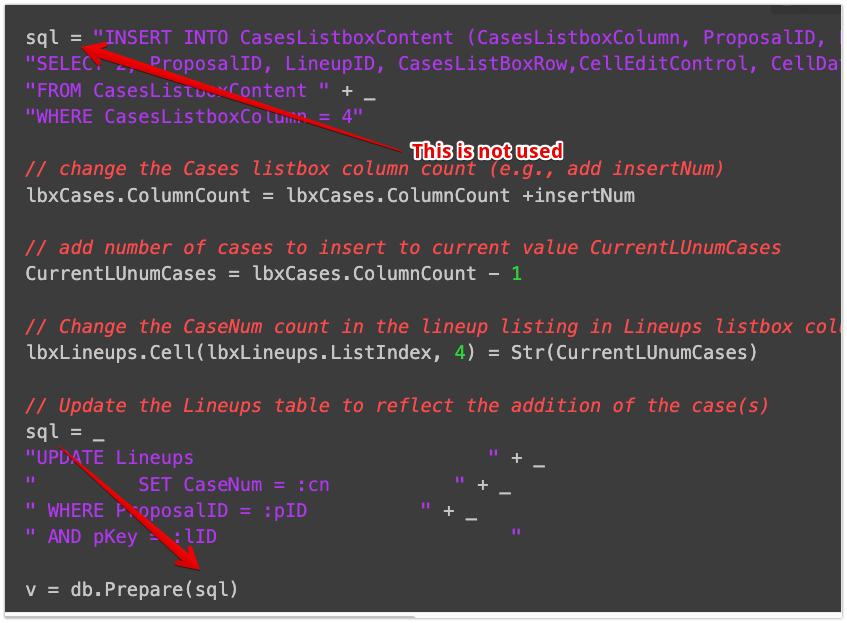
  sql = "INSERT INTO CasesListboxContent (CasesListboxColumn, ProposalID, LineupID, CasesListBoxRow,CellEditControl, CellDataSource) " + _
  "SELECT 2, ProposalID, LineupID, CasesListBoxRow,CellEditControl, CellDataSource " + _
  "FROM CasesListboxContent " + _
  "WHERE CasesListboxColumn = 4"
// change the Cases listbox column count (e.g., add insertNum)
lbxCases.ColumnCount = lbxCases.ColumnCount +insertNum
// add number of cases to insert to current value CurrentLUnumCases
CurrentLUnumCases = lbxCases.ColumnCount - 1
// Change the CaseNum count in the lineup listing in Lineups listbox column 4
lbxLineups.Cell(lbxLineups.ListIndex, 4) = Str(CurrentLUnumCases)
// Update the Lineups table to reflect the addition of the case(s)
sql = _
"UPDATE Lineups " + _
" SET CaseNum = :cn " + _
" WHERE ProposalID = :pID " + _
" AND pKey = :lID "
v = db.Prepare(sql)
ps = v
ps.BindType("cn", SQLPreparedStatementMBS.kTypeLong)
ps.BindType("pID", SQLPreparedStatementMBS.kTypeLong)
ps.BindType("lID", SQLPreparedStatementMBS.kTypeLong)
ps.Bind("cn", CurrentLUnumCases)
ps.Bind("pID", Val(CurrentQuoteID)) // Quote Identifier
ps.Bind("lID", Val(CurrentLineupID)) // Lineup Identifier (same as pKey for the item in the database)
ps.SQLExecute
If db.Error Then
// open Modal MsgBox window
taMessage = "UPDATE Lineups CaseNum DB Error: " + db.ErrorMessage
wndModalMsgBox.ShowModal
else
db.Commit // Commit the recordset to the database
end if
// Get CasesListboxContent data for the selected (After Change) Lineup
Dim rsC As RecordSet = db.SQLSelect("SELECT * FROM CasesListboxContent WHERE (ProposalID='" + p + "') AND (LineupID='" + CurrentLineupID + "')")
Dim idxRow, idxCol As Integer
if db.error then // you got some kind of error
// open Modal MsgBox window
taMessage = "SELECT CasesListboxContent DB Error: " + db.ErrorMessage
wndModalMsgBox.ShowModal
Exit // leave this routine after 1st error ... there may be many such errors since the number of records is high
end if
// YES ... CaseListboxContent data exists for this quote ID/lineup ID ... Use it to populate the Cases listbox rows and columns
While Not rsC.EOF
idxRow = rsC.Field("CasesListboxRow").IntegerValue // get the row number of the cell data
idxCol = rsC.Field("CasesListboxColumn").IntegerValue // get the column number of the cell data
lbxCases.Cell(idxRow, idxCol) = rsC.Field("CasesListboxValue").StringValue // place the saved cell contents in the row, column they belong
// place the designator for which control will be enabled for the user to edit the cell in its cell tag
lbxCases.CellTag(idxRow, idxCol) = rsC.Field("CellEditControl").StringValue
rsC.MoveNext
Wend
rsC.Close
// set the alignment of all columns after the 1st one to "CenterAlign"
for colcnt As Integer = 1 to lbxCases.ColumnCount - 1
lbxCases.ColumnAlignment(colcnt) = ListBox.AlignCenter
next
// make sure headers are disabled (from sorting)
for jLoop As Integer = 0 to lbxCases.ColumnCount - 1
lbxCases.HeaderType(jLoop) = 1 // make sure headers are disabled (from sorting)
next
lbxCases.InvalidateAllCells
// Populate the Cases listbox column headers
// Place proper headings at top of Cases listbox
lbxCases.heading(0)="Specification"
// Add the headers at the top of each Cases listbox column with indicator (*) as to whether there is lighting data associated with the case or not
for caseCol As Integer = 1 to CurrentLUnumCases
lbxCases.heading(caseCol)="Case/Room" + Str(caseCol)
next
wndStatusMsgBox2.Close // close the message window
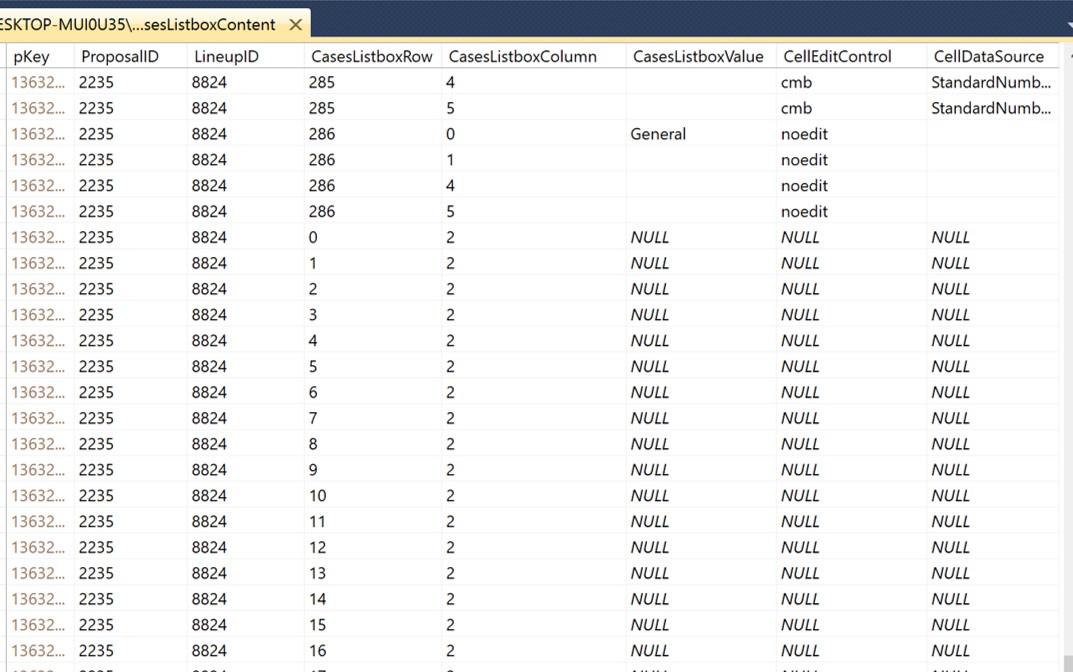
That did it! I now get new records with “most” of the data transferred. For some reason, one of the attributes (CasesListboxRow) is not being copied. Hopefully, I can find that problem quickly.
Many, many thanks to you and Kem for sharing your valuable time and expertise with me. I am most grateful!
I got so hung up on the body of the SQL statement required that I forgot to append the SQL SELECT statement itself. Sometimes I make things harder than they really are!
Thanks so much to you and Alberto, Kem. If you guys lived near me, I’d buy you a beer!
 )
)