I only want to fill up to 8 bits (1 byte).
Hang on a minute.
What you are actually wanting to do is create a string which is a binary representation of a number held in a byte?
This number is 120 in decimal…
to get the full binary string, you can just use
dim s as string
s = bin(120)

//result = “111100”
If you are staring with a binary value which has arrived as a nibble…
dim s as string
dim v as byte
v = &b1111
//we have a nibble and want to push it into the higher nibble
v = v * 8

s = bin(v)
The “1111” was just a random example. I got different binary strings returned, with different lengths, from 0 to already wanted length of 8. In the end I want to ensure it has a length of 8 bits (1 byte), no matter what it was before.
If you get sent 1111 , that’s 15 decimal
If you pad on the right to end up with 1111000, you make it into 120 decimal
So padding on the right with zeroes sounds a little dangerous - are you sure you end up with the right values?
Thanks, I’m aware of that. Sorry to all for that confusion, bad typo!
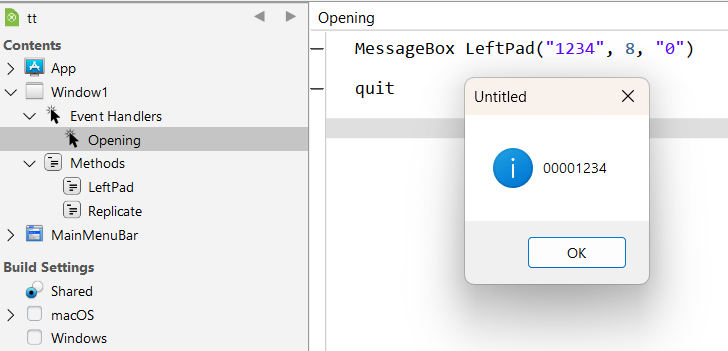
I need to fill up on the left side in this case: “1111” → “00001111”. I was initially asking for LPAD, RPAD. So if there would be an LPAD, there would also be an RPAD function. In my case I would do a LPADding while others might need RPAD for their purposes.
Use my previous Replicate() function + this LeftPad() function:
Public Function LeftPad(str As String, size As Integer, padChar As String = " ") As String

  If padChar.Length <> 1 Then
    Raise New RuntimeException("The pad char must have a length of 1")
  End
  Return Replicate(padChar, size - str.Length) + str

End Function