i saw this too
i’m sorry, do you mind sharing your work flow ?
so from what i understand LLM cannot deal with xojo xml that is used to git,
it can only work with files ending with xojo.code ? is is this text file?
do you write xojo code regulary in claude ? it works ?
we didn’t have much feedback of people using llm with xojo
elon musk published a coding benchmark yesterday showing grok 4 is in first position lol
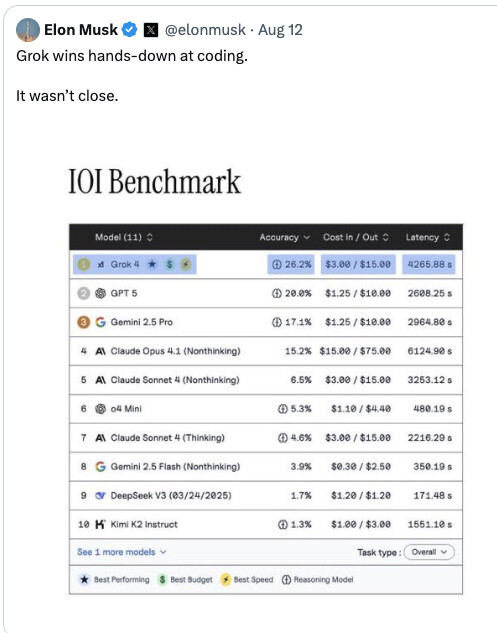
but i saw many youtube feedback saying claude is much better than gpt 5, grok any good ?
xml <> txt; I believed git use txt files (not Xojo xml)
And Elon Musk cannot tell his grok is below anything else… 
Yes, xojo_code text.
This is a part of a Claude Code log from my project.
(this is not raw; translate from Japanese output for post)
Please explain imSelectionRect.xojo_code.
imSelectionRect.xojo_code is a custom control class for displaying the image selection area of the PDFindexer application.
Class Overview
-
Inheritance: A custom UI component that inherits from
DesktopCanvas. -
Primary Features:
-
Opening Event (lines 6-26)
- Creates a 32x32 pixel square image.
- Draws with the highlight color.
- Depending on the state of
imageWindow.imLayoutLassoHasContents:- True: Draws a filled rectangle.
- False: Draws only the outline of a rectangle.
- Sets a mask for a semi-transparent effect (
&c999999).
-
Paint Event (lines 30-43)
- Handles the drawing process for the selection area.
- If
imLayoutLassoHasContents = True:- Displays a semi-transparent filled image.
- Process that always runs:
- Draws a border with the highlight color.
-
Properties
myPicture As Picture: The image object for drawing.
-
-
Purpose
This class is used to visually highlight the area selected by the user within the image window. It provides different drawing styles (filled/outline-only) depending on whether a selection area exists and allows the underlying image to show through via a semi-transparent effect.
Are there any areas that should be refactored?
Update Todos
- ☐ Analyze areas for refactoring in the imSelectionRect class
Yes, there are several areas that can be refactored:
-
Remove Duplicate Code
- Problem: The same conditional logic is duplicated in the
OpeningandPaintevents.If imageWindow.imLayoutLassoHasContents = True Then // Fill process Else // Outline-only process End If
- Problem: The same conditional logic is duplicated in the
-
Make Magic Numbers Constants
- Problem: Hard-coded values.
32, 32, 32(image size)&c999999(mask color)
- Problem: Hard-coded values.
-
Reduce External Dependencies
- Problem: Direct reference to
imageWindow.imLayoutLassoHasContents.
- Problem: Direct reference to
-
Separate Method Responsibilities
- Problem: The
Openingevent performs multiple tasks:- Image creation
- Fill/outline drawing
- Mask setting
- Problem: The
Recommended Refactoring
```xojo
#tag Class
Protected Class imSelectionRect
Inherits DesktopCanvas

  // Add constants
  #tag Constant, Name = kImageSize, Type = Integer, Dynamic = False, Default = "32", Scope = Private
  #tag Constant, Name = kMaskColor, Type = Color, Dynamic = False, Default = "&c999999", Scope = Private

  // Add property
  #tag Property, Flags = &h1
    Protected hasContents As Boolean = False
  #tag EndProperty

  // Method to determine drawing mode
  Private Function shouldFillRect() As Boolean
    Return Me.hasContents
  End Function

  // Separate image creation
  Private Sub createSelectionImage()
    myPicture = New Picture(kImageSize, kImageSize, 32)
    drawSelectionShape()
    applyTransparencyMask()
  End Sub

  // Separate shape drawing
  Private Sub drawSelectionShape()
    myPicture.Graphics.ForeColor = HighlightColor
    If shouldFillRect() Then
      myPicture.Graphics.FillRect 0, 0, kImageSize, kImageSize
    Else
      myPicture.Graphics.DrawRect 0, 0, kImageSize, kImageSize
    End If
  End Sub
```
Main Improvements:
- Removal of duplicate code
- Making magic numbers into constants
- Clear separation of responsibilities
- Reduction of external dependencies
Update Todos
- ☒ Analyze areas for refactoring in the imSelectionRect class
Proceed.
Update Todos
- ☒ Analyze areas for refactoring in the imSelectionRect class
- ☐ Execute refactoring of imSelectionRect.xojo_code
Update(imSelectionRect.xojo_code)
- Updated imSelectionRect.xojo_code with 60 additions and 22 removals
     2    Protected Class imSelectionRect
     3    Inherits DesktopCanvas
     4      #tag CompatibilityFlags = (TargetDesktop and (Target32Bit or Target64Bit))
     5 +
     6 +    #tag Constant, Name = kImageSize, Type = Integer, Dynamic = False, Default = "32", Scope = Private
     7 +    #tag EndConstant
     8 +
     9 +    #tag Constant, Name = kMaskColor, Type = Color, Dynamic = False, Default = "&c999999", Scope = Private
    10 +    #tag EndConstant
    11 +
    12      #tag Event
    13        Sub Opening()
    14 -        // create a square in current Highlight Color
    15 -        myPicture = New Picture(32, 32, 32)
    16 -        myPicture.Graphics.ForeColor = HighlightColor
    17 -
    18 -        If imageWindow.imLayoutLassoHasContents = True Then
    19 -          myPicture.Graphics.FillRect 0, 0, 32, 32
    20 -        Else
    21 -          myPicture.Graphics.DrawRect 0, 0, 32, 32
    22 -        End If
    23 -
    24 -        // set mask so it is semi-transparent
    25 -        myPicture.Mask.Graphics.ForeColor = &c999999
    26 -        If imageWindow.imLayoutLassoHasContents = True Then
    27 -          myPicture.Mask.Graphics.FillRect 0, 0, 32, 32
    28 -        Else
    29 -          myPicture.Mask.Graphics.DrawRect 0, 0, 32, 32
    30 -        End If
    31 -
    14 +        createSelectionImage()
    15        End Sub
    16      #tag EndEvent
    17 ...
    30        Sub Paint(g As Graphics, areas() As Rect)
    31          // fill inside of frame with semi-transparent hilite, then
    32          // draw solid hilite around the edge
    33 -        If imageWindow.imLayoutLassoHasContents = True Then
    33 +        If hasContents Then
    34            g.DrawPicture myPicture, 0, 0, Me.Width, Me.Height, _
    35            0, 0, myPicture.Width, myPicture.Height
    36          End If
    37
    38          g.ForeColor = HighlightColor
    39          g.DrawRect 0, 0, Me.Width, Me.Height
    40        End Sub
    41      #tag EndEvent
    42
    43 +    #tag Method, Flags = &h21
    44 +      Private Sub applyTransparencyMask()
    45 +        // set mask so it is semi-transparent
    46 +        myPicture.Mask.Graphics.ForeColor = kMaskColor
    47 +        If shouldFillRect() Then
    48 +          myPicture.Mask.Graphics.FillRect 0, 0, kImageSize, kImageSize
    49 +        Else
    50 +          myPicture.Mask.Graphics.DrawRect 0, 0, kImageSize, kImageSize
    51 +        End If
    52 +      End Sub
    53 +    #tag EndMethod
    54
    55 +    #tag Method, Flags = &h21
    56 +      Private Sub createSelectionImage()
    57 +        // create a square in current Highlight Color
    58 +        myPicture = New Picture(kImageSize, kImageSize, 32)
    59 +        drawSelectionShape()
    60 +        applyTransparencyMask()
    61 +      End Sub
    62 +    #tag EndMethod
    63 +
    64 +    #tag Method, Flags = &h21
    65 +      Private Sub drawSelectionShape()
    66 +        myPicture.Graphics.ForeColor = HighlightColor
    67 +        If shouldFillRect() Then
    68 +          myPicture.Graphics.FillRect 0, 0, kImageSize, kImageSize
    69 +        Else
    70 +          myPicture.Graphics.DrawRect 0, 0, kImageSize, kImageSize
    71 +        End If
    72 +      End Sub
    73 +    #tag EndMethod
    74 +
    75 +    #tag Method, Flags = &h21
    76 +      Private Function shouldFillRect() As Boolean
    77 +        Return hasContents
    78 +      End Function
    79 +    #tag EndMethod
    80 +
    81 +    #tag Method, Flags = &h0
    82 +      Sub updateContentsState(newState As Boolean)
    83 +        If hasContents <> newState Then
    84 +          hasContents = newState
    85 +          createSelectionImage()
    86 +          Invalidate()
    87 +        End If
    88 +      End Sub
    89 +    #tag EndMethod
    90 +
    91 +    #tag Property, Flags = &h21
    92 +      Private hasContents As Boolean = False
    93 +    #tag EndProperty
    94 +
    95      #tag Property, Flags = &h1
    96        Protected myPicture As Picture
    97      #tag EndProperty
Update Todos
- ☒ Analyze areas for refactoring in the imSelectionRect class
- ☒ Execute refactoring of imSelectionRect.xojo_code
Refactoring is complete. Main improvements:
Implemented Improvements
-
Added Constants
kImageSize = 32: Eliminated the magic number for image size.kMaskColor = &c999999: Made the mask color a constant.
-
Reduced External Dependencies
- Removed the direct reference to
imageWindow.imLayoutLassoHasContents. - Changed to an internal property
hasContents.
- Removed the direct reference to
-
Separation of Responsibilities
createSelectionImage(): Manages image creation.drawSelectionShape(): Handles shape drawing.applyTransparencyMask(): Sets the transparency mask.shouldFillRect(): Determines the drawing mode.
-
New Public Method
updateContentsState(Boolean): For updating the state from external sources.- Executes redraw only when the state changes.
- Updates the screen with
Invalidate().
Change in Usage
-
Before:
// Direct reference from imageWindow imageWindow.imLayoutLassoHasContents = True -
After:
// State is managed by the control
selectionRect.updateContentsState(True)
This has improved the code’s maintainability and reusability and has reduced external dependencies.
ok just tried a new empty xojo project saved as text.
asked claude code to do some stuffs in it and it did very well.
use context7 mcp to make it read the documentation
add some rules naming conventions etc, asked it to build the documentation file
started to create a xojo-pro agent, but it needs some more work !
it’s so awesome !
let’s use it too much to see the limits…
@Geoff_Perlman : would be nice to have a “refresh” button to load the project from the drive instead of having to close and reopen it ! thanks !
I usually do a small change, then use ‘Revert to Saved’ option under File menu.
Of course, have a direct option is better.
Interesting idea.
with an option in settings to display it or not, disabled by default.
definitely not for beginners !
for the records, I use arduino ide and xcode, and they refresh the code automatically when edited from external app…
TextEdit (macOS/Apple) have it by default for everyone.
Preview allows you to navigate in the image changes done during the session.
I have had a lot of success “priming” claude with xojo_code files and it can create new ones with UI, properties, methods, events intact. Xojo_code is preferable to XML because it’s smaller in filesize, therefore less tokens and can remain in context longer.
About 80% of the time it will mess up the xojo_code format though, and I’ll have to go through it manually with a text editor to figure out what it broke and correct it prior to import. BBEdit works great for this, especially since you can quickly switch between a valid reference file and the broken one to compare.
Inspired by this great idea, I’ve made the following changes:
I assigned the shortcut Command+Shift+R to the “Revert to Saved” menu in Xojo’s settings.
I also modified my claude code custom command, xojo.md, to execute Command+Shift+R and press return key.
---
allowed-tools: Bash(open:*),Bash(osascript:*)
description: "Operates Xojo in the mode specified by the argument (open, run, build)."
---

# Argument open, or no argument
In Bash, run "open -a Xojo *.xojo_project"

# Argument run
In Bash, run the following:
osascript -e 'tell application "Xojo" to activate' -e 'delay 0.1' -e 'tell application "System Events" to tell process "Xojo" to keystroke "r" using {command down, shift down}' -e 'delay 0.1' -e 'tell application "System Events" to tell process "Xojo" to keystroke return'
osascript -e 'tell application "Xojo" to activate' -e 'delay 1' -e 'tell application "System Events" to tell process "Xojo" to keystroke "r" using command down'

# Argument build
In Bash, run the following:
osascript -e 'tell application "Xojo" to activate' -e 'delay 0.1' -e 'tell application "System Events" to tell process "Xojo" to keystroke "r" using {command down, shift down}' -e 'delay 0.1' -e 'tell application "System Events" to tell process "Xojo" to keystroke return'
osascript -e 'tell application "Xojo" to activate' -e 'delay 1' -e 'tell application "System Events" to tell process "Xojo" to keystroke "b" using {command down, shift down}'
I did not experience this behavior. played with a few hours and it never broke the project. I had to give it some examples, I made some windows myself, saved them and told it to look into the generated text.
does xojo save the debug message output somewhere automatically ? or is it only in ram and you can only save it as ?
@Geoff_Perlman this would also be a nice feature to help LLM see the debug output if this can be saved each time automatically.
I’m not sure whether debug messages are saved.
Here’s a way to get build errors:
If possible, it would be great if runtime errors could be retrieved as well.
it’s mainly to get the message console content. claude uses it a lot to display debug messages and you have to copy paste from the message to claude all the time
made a feature request for accessing the message and error window from xojoscript
https://tracker.xojo.com/xojoinc/xojo/-/issues/79733
you could submit here
and another coding benchmark from Kimi, China, to be better than ChatGPT…
I modify my answer: playing with claude code for a while I did experience projects that did not open anymore after claude code changes. it did it twice, and was almost able to find it’s mistakes.
grep -n -E '\\\"|#tag (Class|Method|Property|Constant|ViewBehavior)|#tag End' *.xojo_code
this script helps to find bad escapes in the xojo text code.